SSuite Gif Animator
... is a powerful tool that allows you to create, edit, and enhance gif animations and slideshows with ease and precision. The software is user-friendly, making it ...

Tourweaver Professional creates interactive virtual tours from panoramas and still photographs. It adds hotspots, maps and floorplans, popup information, video and Flash content, then publishes tours as HTML, video or standalone EXE files. Customizable templates, scene navigation and map radars help organize guided presentations for properties, venues and attractions.
| Author: | Easypano Holdings Inc. |
| License: | Trialware |
| Price: | $799.95 |
| Released: | Oct 16, 2019 |
| File size: | 43.40 MB |
| Downloads: | 360 |
| Keywords: | tour presentation, Windows 10 compatible, virtual tour presentation, floor plan tour creator, Virtual Tour Software, Interactive Panoramic Experience, virtual tour publishing, create virtual tour, Easypano Holdings Inc., creator, x64 architecture, world tour creator, virtual tour, virtual tour creator, create, panorama tour software, Tourweaver Professional, interactive virtual tour |
| Author URL: | http://www.easypano.com/ |
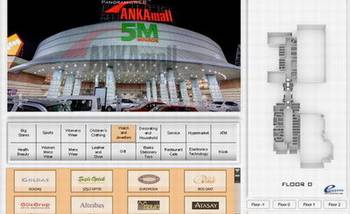


Tourweaver Professional is a virtual-tour authoring program for real estate professionals, tourism businesses, museums and other organizations that need to present places through interactive scenes. It combines panoramic views and still photographs with maps, floorplans, video and Flash elements, letting creators assemble a guided experience rather than a collection of disconnected images. The finished tour can direct visitors between locations and provide additional visual or written context along the way.
Scenes can contain hotspots that link to another scene or open a popup window. Hotspot hints can use images or Flash content to make interactive points easier to identify. Popup windows can display detailed images and information, while video can be placed in the main viewing area or in a popup. Flash content can also be added to scenes, maps and windows for playback within the tour. These components are useful for highlighting property features, exhibits, attractions or other points of interest without interrupting the visitor's route.
Maps and floorplans provide a spatial overview of the tour. Multiple maps can be included, and radar markers show where the current scene sits on a map or floorplan. Tour templates can be customized with buttons, text areas, thumbnails and movie controls, helping creators tailor navigation and presentation to the material. The Professional edition also supports a branded loading window, a Flash progress bar and full-screen display for the scene viewer, map viewer and other added components.
Completed tours can be published as HTML based on Flash, as video, or as standalone EXE files; video and EXE output are Professional edition features. HTML tours can be uploaded and embedded in web pages, while executable tours can be distributed on CD or used in presentations such as PowerPoint. These options suit projects intended for online viewing as well as client handoffs and in-person presentations.
Tourweaver Professional is trialware. Its documented operating-system support covers older Windows releases through Windows 8, so compatibility with current Windows versions should be checked before relying on it. Its Flash-based publishing options also depend on support for Flash in the intended viewing environment; creators should consider that requirement when choosing an output format and distribution method.