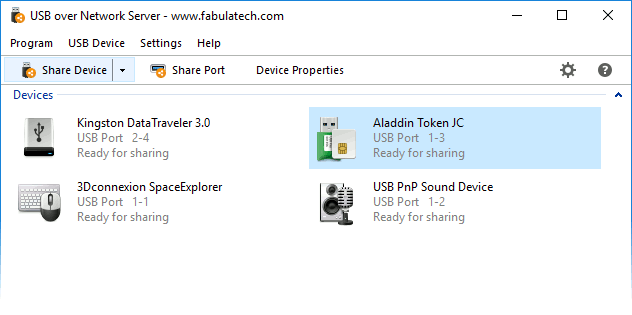
USB over Network for Windows 10 - Full description
USB over Network lets users share USB hardware across a local network or the internet, so a device can be accessed from a computer that is not physically connected to it. It is intended for remote workers, IT administrators, developers and organizations that need to use peripherals or USB-dependent hardware from multiple locations. Instead of moving a device between computers, users can make it available over the network and connect to it remotely.
The software supports devices such as printers, scanners and USB dongles. This can help when a peripheral is attached to a workstation or server in another room, office or site, while the person who needs it works elsewhere. Remote access can also be useful for development and testing tasks that depend on a particular USB device, or when a hardware key must remain connected to a designated machine. The device remains physically attached to its host, while network access extends where it can be used.
USB over Network is designed for use across mixed operating-system environments, with Windows, Linux and macOS support. Its interface guides users through setup and provides a way to share and connect to remote devices. Access controls let administrators decide who may connect to particular USB hardware, which is useful when a device should be available only to selected users. The software also uses encryption for network-transmitted data, an important consideration when access takes place beyond a trusted local network.
For everyday use, the program runs in the background after installation, allowing shared devices to remain available without constant manual setup. Data compression is used to reduce network bandwidth demands, while low-latency transfer is intended to make remote device interaction more responsive. Actual performance depends on the device, network and task; USB hardware that transfers large amounts of data may place different demands on a connection than a dongle used for authorization.
USB over Network is commercial software offered as a demo. It is available for Windows 10 and Windows 11, as well as a range of Windows Server releases, and also supports Linux and macOS. It can suit home offices and business networks that need remote USB access without relocating peripherals. Administrators should consider network reliability and device access policies when deciding where to share hardware, particularly if the device handles sensitive data or is required for time-critical work.