ImgDrive
ImgDrive by Yubsoft is a powerful and intuitive virtual drive software designed to enhance your Windows 10 experience. This lightweight application allows users to mount ISO, IMG, and other image files as virtual ...

Virtual CloneDrive creates virtual CD, DVD and Blu-ray drives so Windows can open disc image files without physical media. It integrates mounting and unmounting into Windows Explorer, supports formats such as ISO and BIN, and can run up to 15 virtual drives at once. An option can automatically mount the last-used image at startup. It is freeware from RedFox.
| Author: | RedFox |
| License: | Freeware |
| Price: | FREE |
| Released: | Mar 5, 2025 |
| File size: | 1.70 MB |
| Downloads: | 401 |
| Keywords: | mount bin image, user-friendly interface, Virtual CloneDrive, mounter, DVD/CD drive virtualization, ISO mounting, disc image emulation, virtual cd drive, mount, virtual dvd drive, virtual drive, emulate, mount iso image, ISO, drive mounter, mount image, disc image mounter, SlySoft Inc., virtual clonedrive download |
| Author URL: | https://www.elby.ch/products/vcd.html |

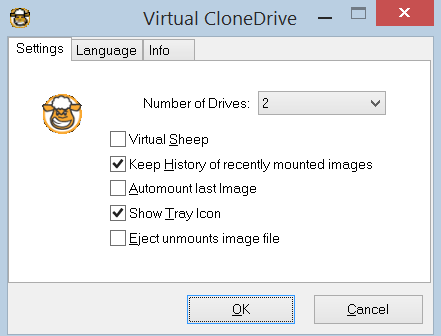



Virtual CloneDrive is a Windows utility that creates virtual CD, DVD and Blu-ray drives for opening disc image files without inserting physical media. It is useful for people who keep software installers, video discs or data backups as images, as well as administrators who need to access several disc images during setup or testing. Once mounted, an image appears to Windows as a disc in a drive, so compatible applications can use it much like a physical CD or DVD.
The program works with formats such as ISO and BIN, and integrates its mounting actions into Windows Explorer. Users can right-click a supported image file and mount it, then browse its contents or open it in an application. Unmounting releases the virtual drive when the image is no longer needed. This avoids the need to burn a disc simply to access files stored in an image, and keeps the operation within familiar Windows file-management workflows.
Virtual CloneDrive can provide up to 15 virtual drives at the same time. This lets users keep multiple images mounted and switch among them without repeatedly replacing physical media or mounting each image over the previous one. An option to mount the most recently used image automatically at startup can suit workflows that regularly rely on the same disc image; users who prefer manual control can mount and unmount images as needed.
Typical uses include opening archived disc contents, accessing an installer saved as an ISO, and testing software distributed in disc-image form. It can also help when a computer has no optical drive, or when the original media is inconvenient to use. The virtual drive presents the image to Windows, but it does not convert or edit the image itself, and access to its contents still depends on the image being readable and the relevant application supporting its files.
Virtual CloneDrive is freeware from RedFox. The supplied compatibility information includes Windows 10 and Windows 11, as well as earlier Windows releases. Its lightweight design and Explorer integration keep routine mounting tasks simple, while the multiple-drive support serves users who handle several images at once.