
WinToFlash

WinToFlash 1.13.0000

Create bootable USB media from installation discs

WinToFlash copies Windows installation files from a CD or DVD to a USB drive and prepares the drive to boot a computer. Its wizard also transfers LiveCDs, including BartPE. The USB can be used to install Windows on systems without an optical drive, then erased and formatted for everyday storage.

WinToFlash 1.13.0000 details

Author:
License: Freeware
Price: FREE
Released:
File size: 8.77 MB
Downloads: 655
Keywords: bootable USB creator, USB installer, Windows 10, windows installation media, bootable flash drive, WinToFlash, windows usb installer, livecd usb creator, system utilities, Windows to USB, Win2flash, Novicorp, Win2USB, Win To Flash, x64 software, bootable usb creator, cd to usb transfer, Transfer
Author URL: http://wintoflash.com
WinToFlash screenshot
WinToFlashSystem MaintenanceWindows XP, Windows Vista, Windows Vista x64, Windows 7, Windows 7 x64, Windows 8, Windows 8 x64, Windows 10, Windows 10 x64, Windows 10, Windows 10 x64

User Rating: 3.0 (3 votes)

Windows 10

x32

Windows 10

x64

WinToFlash Awards

Windows 10 download editor's pick

WinToFlash for Windows 10 - Full description

WinToFlash is a Windows utility for copying installation media to a USB drive and preparing it to boot a computer. It is intended for users who need to install Windows on a machine without relying on an optical drive, including netbooks and other computers that can boot from USB. It can also transfer a LiveCD environment to USB, making removable media a practical alternative to carrying or using a disc.

A wizard guides the transfer from a Windows installation CD or DVD. The user selects the source media and USB destination, then WinToFlash copies the setup files and prepares the drive as a bootable installer. The resulting USB can be used to start a compatible computer and run Windows Setup. This is useful when the target computer has no optical drive, or when installation media is easier to keep on a flash drive than to access on disc.

The utility also handles LiveCD media, including BartPE. A bootable USB made from a LiveCD can provide access to that environment without the original optical disc. Keeping setup files on USB can also reduce dependence on fragile or misplaced discs; the original media remains available as a source, while the drive provides a reusable way to start installation or a live environment.

After a transfer, WinToFlash can erase the USB media and format it for ordinary use. This lets the drive return to storing everyday files when it is no longer needed as bootable media. The same removable drive can therefore serve first as installation or LiveCD media and later as general-purpose storage, although formatting it removes its existing contents.

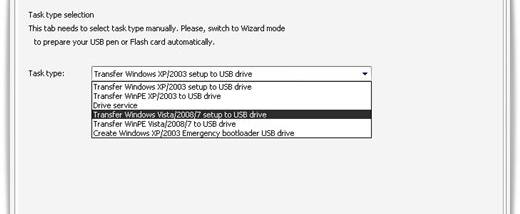
WinToFlash supports transferring Windows XP, Windows 2003, Windows Vista, Windows 2008 and Windows 7 setup media, as well as LiveCDs. It is freeware and is intended for Windows; listed supported desktop systems extend through Windows 10. The computer being installed must support booting from USB, and the USB drive must have enough capacity for the selected source. The program prepares the installer media rather than replacing the Windows installation process itself.

WinToFlash for Windows 10 - Post your review