BootPerformanceView
... startup with BootPerformanceView, an innovative utility developed by Nir Sofer. This lightweight tool provides a comprehensive analysis of your Windows 10 boot process, allowing you ...

Discover AppReadWriteCounter, a powerful utility from Nir Sofer designed for Windows 10 users who want to monitor their applications' file access activities. This lightweight tool provides real-time insights into how many read and write operations each application performs, helping you understand resource usage and optimize performance. With its intuitive interface, you can easily track file interactions without complex setups. Perfect for developers and power users alike, AppReadWriteCounter is an essential addition to your software toolkit for enhanced system management.
| Author: | Nir Sofer |
| License: | Freeware |
| Price: | FREE |
| Released: | Oct 4, 2025 |
| File size: | 61 kB |
| Downloads: | 13 |
| Keywords: | file access monitoring, Nir Sofer, download AppReadWriteCounter, read, file activity monitor, counter, application usage tracking, read write statistics, Windows 10 utility, performance analysis, write operations, trace, AppReadWriteCounter, system performance analysis, AppReadWriteC, read operations, trace application |
| Author URL: | http://www.nirsoft.net/ |

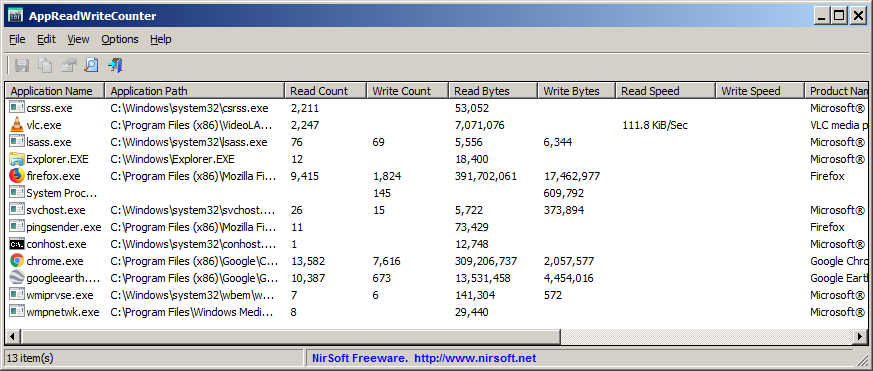
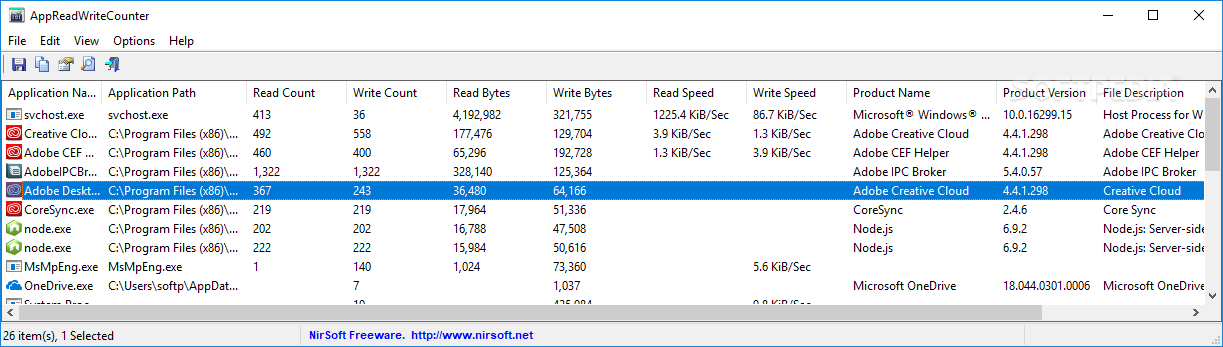
Discover the power of AppReadWriteCounter, an innovative tool developed by Nir Sofer, designed to give you unparalleled insights into your system's file access patterns. This lightweight utility allows users to monitor and analyze the read and write operations of applications in real-time, making it an essential resource for developers, system administrators, and tech enthusiasts alike.
With its intuitive interface, AppReadWriteCounter simplifies the process of tracking how often files are accessed, helping you identify performance bottlenecks and optimize your applications. Whether you're troubleshooting software issues or conducting performance assessments, this tool provides detailed statistics that can enhance your understanding of file interactions on your Windows 10 system.
AppReadWriteCounter is portable, requiring no installation, and is compatible with various Windows versions, ensuring that you can easily integrate it into your workflow. Experience the efficiency of precise file monitoring and take control of your system's performance with AppReadWriteCounter today!