Portable Back4Sure
Portable Back4Sure is a file backup utility for people who ... on a separate hard drive or backup drive. Portable Back4Sure can compress backup data, which may reduce the ...

Back4Sure x64 backs up selected folders from multiple locations or drives, using configurable inclusion and exclusion filters. It can copy files directly or package them in ZIP or 7ZIP archives, with options for archive naming, passwords and directory depth. Saved jobs, consistency checks, logs, scheduled before-and-after actions and destination cleanup support repeatable backups. It is freeware for 64-bit Windows and can run portably without installation.
| Author: | Ulrich Krebs |
| License: | Freeware |
| Price: | FREE |
| Released: | Mar 10, 2024 |
| File size: | 3.60 MB |
| Downloads: | 350 |
| Keywords: | folder backup utility, x64 backup data, zip backup tool, x64 backup job, 7zip backup software, portable backup program, x64 backup, backup job scheduler, data backup, x64 backup drive, file backup software, portable software, x64 partition, data recovery, x64 restore, Back4Sure x64, file synchronization, Ulrich Krebs |
| Author URL: | https://www.ukrebs-software.de/ |
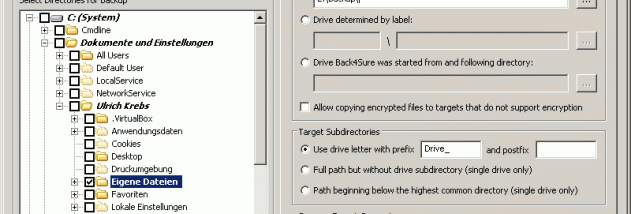

Back4Sure x64 is a file-backup utility for Windows users who need to copy selected documents, photos, music, videos and other folders to a backup destination. Its folder tree can gather sources from different locations and drives into one backup job, while exclusions keep unwanted folders out. This makes it useful for personal backups as well as repeatable jobs that cover files spread across a computer rather than a single directory.
A filter system controls which files are included or skipped. Filters can apply to the entire job or be set for individual folders, allowing a backup to focus on particular file types or omit selected content. Jobs can copy files directly or store them in ZIP or 7ZIP archives. For compressed backups, users can choose the archive name, format and password, and set directory depth to determine how files are grouped. Splitting content into multiple archives can help avoid one oversized archive and make the backup easier to handle.
Saved job settings can be reused for later runs, and a consistency check helps verify that a job is configured as intended. Back4Sure can write a plain-text log of backup actions, with a readable format or an INI-style format suited to automated processing. Optional confirmations provide control during execution, while scheduled actions can run before or after a backup. The cleanup option compares the destination with the current sources and removes orphaned files that no longer have corresponding source files; this is helpful after folders are reorganized, but should be configured with care because it deletes destination content.
Typical uses include keeping a copy of important personal files on another drive, assembling several scattered folders into a regular backup, and maintaining a destination after source files have been moved or removed. Because files are copied in their original form or placed in standardized archive formats rather than a proprietary container, individual files can be accessed with a file manager or compatible archive utility without relying on Back4Sure to retrieve them.
Back4Sure x64 is freeware and is designed for 64-bit Windows systems. It can run from a flash drive without installation and does not require a background service or extension, making it suitable for portable backup work. Its range of filters, archive options and cleanup controls provides flexibility, while the saved job file and logs support repeatable use and review.