ReNamer Portable
Welcome to the home of ReNamer Portable, a dynamic and versatile software developed by ... game-changer in file management. Experience the power of ReNamer Portable today and revolutionize the way you manage ...

BS Rename is a portable batch-renaming utility for changing file names and extensions in a selected folder. It can add or replace text, trim characters, change letter case, and apply sequential numbers with configurable starts, steps, and padding. A preview shows proposed names before changes are applied. File masks help select items, while options can replace underscores with spaces and remove duplicate spaces.
| Author: | Broto Suseno |
| License: | Demo |
| Price: | $1.19 |
| Released: | Oct 10, 2026 |
| File size: | 2.20 MB |
| Downloads: | 63 |
| Keywords: | rename file, batch file renamer, portable file renamer, replace text in filenames, naming, file rename, bulk rename files, rename, BS Rename free download, rename file extensions, renamer, BS Rename, batch rename, sequential file numbering, batch, download BS Rename |
| Author URL: | https://sites.google.com/site/bsprograms/the-programs/bs-fag |
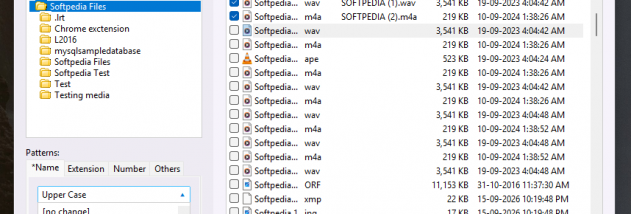



BS Rename is a portable batch-renaming utility for people who need to apply consistent naming rules to multiple files. Its built-in folder navigator helps locate a directory, and file masks can narrow the selection to matching items. The program works on files in one folder at a time, making it suitable for organizing photo sets, document collections, downloads, and other groups that share a location.
Before applying changes, BS Rename displays the original and proposed file names and extensions, along with each file's size and last-modified date. Name rules include adding a prefix, suffix, or infix; replacing selected text; trimming characters from either end; and changing letter case. These operations can also be applied to file extensions, which is useful when correcting or standardizing extensions across a group. Reviewing the proposed results helps users check the pattern before renaming.
For sequential naming, the utility can add incrementing numbers with a chosen starting value, step, and padding. The number can appear before or after a name or extension, or replace one of them. Additional options convert underscores to spaces, remove repeated spaces, and set dates to the current date. Together, these controls support both straightforward cleanup and more detailed naming schemes without editing each file individually.
BS Rename is designed for direct use rather than installation: its program files can be run from a folder on a drive or from removable storage, and it does not alter Windows registry settings. The folder-based workflow keeps the operation focused on a single directory, so files spread across multiple locations must be handled separately. It is a practical choice for users who want a dedicated renamer with detailed controls over names and extensions, rather than a general file manager.
The software is offered as a demo and supports 64-bit Windows 7, Windows 8, Windows 10, and Windows 11. Its portable setup can be convenient on systems where installing software is undesirable, while its range of options suits users comfortable configuring naming rules before processing files.