Photo Frame Studio
Welcome to the home of Photo Frame Studio, a top-notch software developed by the renowned Mojosoft Business Cards Software. This Windows 10 compatible software is your one-stop solution for all your ...

ContrastMaster is a photo-editing plugin for photographers and image editors who need more control over contrast. Three local methods bring out detail while helping preserve highlights, and four global methods adjust the image's tonal range. Shadow, highlight and color masks help restrict the effect to chosen areas, while saturation and brightness controls refine the result. It also offers six modes, batch processing and support for 8-bit and 16-bit RGB images.
| Author: | Harald Heim |
| License: | Demo |
| Price: | $69.95 |
| Released: | Nov 15, 2018 |
| File size: | 18.30 MB |
| Downloads: | 363 |
| Keywords: | Contrast enhancement, Windows 10 compatible, ContrastMaster Plugin, photo, contrast enhancement, Image processing, Photo editing software, Harald Heim, graphic plugin, photo contrast plugin, global contrast tools, contrast, enhancement, photo contrast, local contrast adjustment, photo masking plugin, batch photo processing |
| Author URL: | https://thepluginsite.com/ |

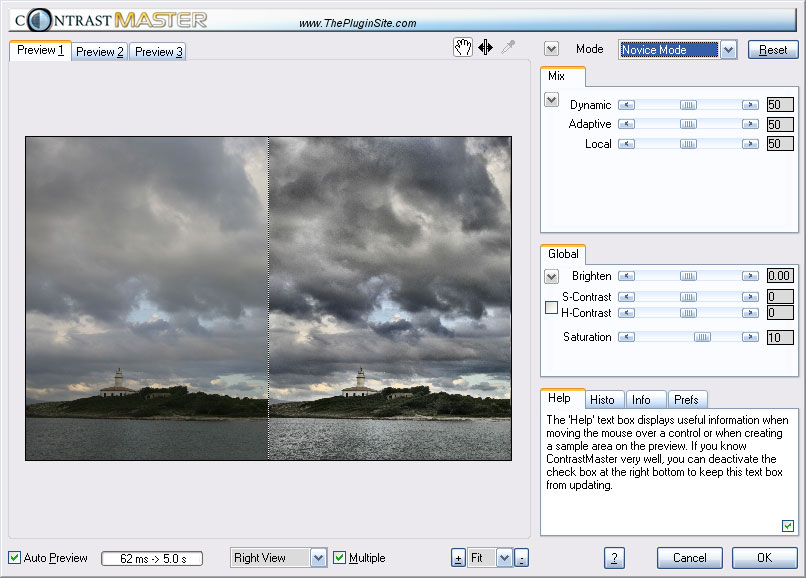


ContrastMaster is a photo-editing plugin for photographers and image editors who want detailed control over tonal contrast. It provides separate local and global adjustment methods, allowing users to bring out fine details, reshape an image's overall tonal range, or combine both approaches. Its controls can produce restrained corrections as well as pronounced, high-contrast treatments, including HDR-like effects and photorealistic, painterly results.
Three local methods adjust contrast in small image details. They are useful for making textures and subtle features more visible while helping preserve highlights and avoid damage to the image. Each method can be applied on its own, or the methods can be mixed to balance their different effects. Four global methods - S/H-Contrast, Stretch, Equalize and Polarize - work across the image's tonal range. A brightness adjustment provides an additional way to refine the final result.
Masking controls help limit where contrast changes appear. Shadow and highlight masks, along with color masks, can reduce or remove the effect in selected areas such as skin, blue sky or a wall. A separate saturation mask helps increase color intensity while reducing the risk of oversaturation. Six working modes range from Novice Mode, which offers a simpler set of controls, to Expert Mode for more involved adjustments.
The plugin can help recover definition in low-contrast photographs, add impact to ordinary shots, or create a more stylized look. Batch processing supports workflows involving multiple image files, while support for 8-bit and 16-bit RGB images accommodates common editing tasks at different color depths. Multi-processor, multi-core and hyperthreading support can make use of available processing resources during image work.
ContrastMaster is distributed as demo software and is intended to run within compatible image-editing software that supports plugins of this type. It is a Windows photo-editing tool; the available system information includes Windows 10. Its masking and adjustment options make it suited to users who want more selective contrast control than a single global slider provides.