Disk Sorter x64 for Windows 10 - Full description
Disk Sorter is a file classification utility for users who need to see how files are distributed across storage. It scans local disks, network shares and NAS devices, then groups files into categories so that large collections are easier to review than through a sequence of manually opened folders. Its reports can help home users, technicians and storage administrators identify which kinds of files occupy the most space.
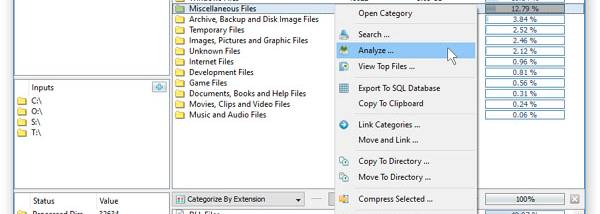
A classification scan examines files in a selected storage location and organizes the results by category. This makes it possible to compare categories by file count and disk usage, and to locate groups that account for a substantial portion of a drive or shared storage. Reviewing category totals can help narrow down where to look when free space is running low, without requiring files to be inspected one by one.
The utility also supports file operations from the classification workflow. Files can be copied, moved or deleted, allowing users to act on the results of a scan - for example, moving a category to another location or removing files no longer needed. These operations make the program useful not only for auditing storage but also for carrying out basic cleanup and reorganization tasks.
Disk Sorter can be used with individual computer disks as well as shared network and NAS storage, making it suitable for both personal storage checks and routine reviews of accessible shared folders. A scan can reveal whether space is concentrated in particular file categories and provide a starting point for deciding what to archive, relocate or remove. Users should review the classification results before performing deletion or move operations, especially when working with shared data.
The free edition is freeware and is intended for straightforward file classification and management. The product family also includes paid editions with additional capabilities, such as advanced rule-based classification and centralized enterprise reporting; those features are not part of the free edition. Disk Sorter is available for Windows, including 64-bit Windows 10 and Windows 11 systems.