DiskTriage Expert for Windows 10 - Full description
DiskTriage Expert is a disk-space analysis utility for administrators and power users who need to understand how storage is being used across a computer or network. Rather than showing only the free and occupied capacity of a drive, it scans files and directories and organizes the results by several properties. This makes it easier to find where space is concentrated, identify large or inactive content, and review storage patterns before deciding what to do.
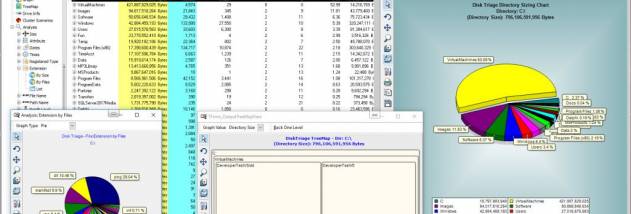
Its directory tree presents storage use at folder level, with breakdowns including size, file and directory counts, percentages, actual space used and wasted space. The tree can also sort or report on file activity and the dates files were created, modified or accessed. These views help narrow an investigation from an entire volume to particular folders, while retaining context about how each directory contributes to overall usage.
Additional analyses group files by size, attributes, date and time, extension, type or owner. Top-ten lists provide a quick way to locate the largest or otherwise notable files in a scan. Owner-based results can help administrators understand which accounts are associated with storage consumption, while extension and file-type views reveal the kinds of content occupying a drive. DiskTriage Expert can also collect NTFS permissions, which is useful when reviewing access settings alongside storage information.
For ongoing maintenance, scan results can be saved to XML or a database and compared with scans made at different times. Comparison highlights changes between scans, and charts of multiple scans show storage growth over time. After identifying files that need attention, users can act on selected results by compressing them with NTFS, moving or copying them, or deleting them. These options connect the analysis to common cleanup and capacity-management tasks, though actions should be checked carefully before they are applied.
DiskTriage Expert is trialware and is intended for Windows systems; its supported operating systems include Windows 10. It is particularly suited to LAN administrators and experienced users who need detailed, repeatable reports rather than a simple visual overview of drive capacity. The range of owner, permission, date and directory data can help with routine storage reviews, investigation of unexpected growth and planning for future capacity needs.