Free HDD LED
Welcome to the home of the Free HDD LED software, a groundbreaking product developed by My ... keep a close eye on their hard drive activity in real-time. Free HDD LED is an ingenious ...

DiskView is a graphical utility for inspecting how files occupy disk clusters. Its map helps locate a file on a drive, while selecting a cluster identifies the file stored there. Double-clicking a cluster opens further information about its associated file, making the tool useful for exploring disk allocation and file locations.
| Author: | Microsoft |
| License: | Freeware |
| Price: | FREE |
| Released: | Oct 15, 2020 |
| File size: | 819 kB |
| Downloads: | 361 |
| Keywords: | x64 software, cluster information tool, graphical disk map, cluster information, file system analytics, hdd, disk usage visualization, disk cluster viewer, disk allocation utility, Windows 10 compatible, activity, Microsoft DiskView, graphic, hdd activity, find file on disk, Sysinternals suite, graphical map, disk space inspection |
| Author URL: | https://www.microsoft.com |
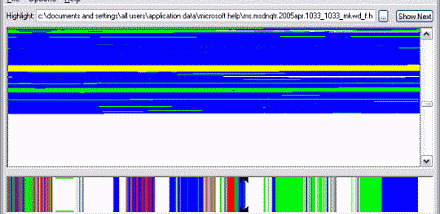

DiskView is a graphical disk-inspection utility for users who want to understand how files occupy space on a drive. Instead of presenting only a list of files and their sizes, it displays a map of disk clusters, the small units in which file data is stored. The map helps connect a file's location to the physical layout of allocated space on the disk.
To investigate a file, DiskView can show where that file is located in the graphical map. Selecting a cluster reveals which file occupies it, making it possible to move from a point on the map to the corresponding file. This view is useful when examining how data is arranged across a disk rather than simply checking how much space a folder uses.
A double-click on a cluster opens more information about the file assigned to it. This provides a closer look at the file associated with a particular part of the map and supports a straightforward workflow: inspect the disk layout, select a cluster, identify its file, then open the file's details. The graphical presentation is intended for exploration and inspection, not as a replacement for a general file manager.
DiskView is suited to users troubleshooting storage questions, learning about disk allocation, or checking where particular files reside. It is a small freeware Windows utility. The supplied platform information includes Windows 10; compatibility with other Windows releases should be checked before installation. The program reports disk layout visually, so interpreting its map may be more useful to users already familiar with files, drives, and clusters.