Recover Deleted Files
... the ultimate solution for recovering deleted files on Windows 10! Introducing "Recover Deleted Files" by pdd.co.in, a powerful software designed to effortlessly restore your lost ...

DMDE is a disk editor and data-recovery utility for locating lost partitions and retrieving files from FAT and NTFS volumes, including damaged file systems. It can search for deleted or formatted data, browse directories, inspect file contents and recover files or folders. Additional tools create or write disk images, clone drives and assemble supported RAID layouts for recovery. The portable program does not require installation.
| Author: | Dmitry Sidorov |
| License: | Demo |
| Price: | $20.00 |
| Released: | Apr 9, 2023 |
| File size: | 1.84 MB |
| Downloads: | 482 |
| Keywords: | raid data recovery, Windows 10, dmde data recovery, recover deleted files, editor, x64 software, disk editor, HDD, ntfs recovery tool, lost partition recovery, data recovery, partition, Data Recovery, Disk Editor, partition editor, Dmitry Sidorov, DMDE, disk editor utility |
| Author URL: | https://dmde.com/ |
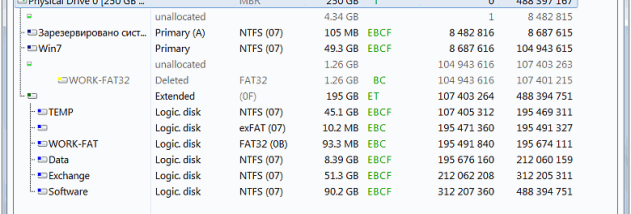




DMDE is a disk editor and data-recovery utility for users who need to inspect storage, locate lost partitions or retrieve files from damaged volumes. It works with FAT12/16, FAT32 and NTFS/NTFS5 file systems, including volumes whose file-system structures are damaged. Its tools are intended for recovery tasks such as restoring files after deletion or formatting, and for examining disks when ordinary file access is unavailable.
The program can search for lost FAT and NTFS partitions by examining boot sectors and file-system structures, including when a partition table is broken or a partition has been removed. A deeper data search uses file-system information to reconstruct directory structures and find recoverable files after more serious damage. Users can browse supported volumes, inspect file data in binary form, and recover files or folders; support for large files and NTFS-compressed files is included.
DMDE also provides disk-image and drive-copying tools. It can create, open and write disk images, or clone a drive, allowing work to be performed on an image or a duplicate rather than the original storage. Its RAID constructor supports RAID-0, RAID-1, RAID-4, RAID-5 and JBOD/spanned configurations, including delayed parity, for assembling arrays when recovering data from a failed RAID system. NTFS utilities can copy or delete files, create or remove directories, and repair file-system structures without relying on the NTFS driver.
These capabilities suit both practical recovery and disk-inspection workflows: a user might search a formatted drive for an earlier directory tree, copy files from a damaged NTFS volume, or combine RAID members to access their contents. Unicode filenames help preserve names in different writing systems, while large-sector support accommodates storage that uses larger sector sizes. Because recovery operations can affect the source disk, working from a disk image or clone can help keep the original unchanged during investigation.
DMDE is portable and does not require installation. It is offered as demo software, and the available Windows compatibility includes Windows XP through Windows 11, with support for both 32-bit and 64-bit editions where listed. The available file systems and recovery results depend on the condition and layout of the storage device; damaged or overwritten data may not be recoverable.