Drives Monitor for Windows 10 - Full description
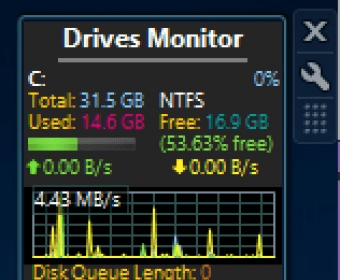
Drives Monitor is a Windows sidebar gadget for checking the status and activity of physical or logical disks. It is suited to people who want drive information visible on the desktop rather than opening a separate utility. The gadget can display free and used space, disk activity, read and write speeds, drive labels, and file-system details, with a real-time graph showing activity over time.
The display can be configured to show physical drives or logical volumes, and individual drives can be excluded from monitoring. Users can choose which information appears and set warning and critical thresholds for disk-space use. The space indicator changes to yellow when free space is low and red when it reaches the critical threshold, making capacity problems easier to notice at a glance.
Clicking a drive letter opens a fly-out with further details, including physical drive model, capacity, type, partition count, cylinders, and sectors. Drives Monitor can also monitor hidden and mounted drives. Clicking the gadget background opens the selected drive in Windows Explorer, providing a quick route from status checking to browsing files. An Eject control is available for safely removing USB devices.
When CrystalDiskInfo is running in the background, the gadget can show drive temperatures and health status based on S.M.A.R.T. data. This adds hardware-health information to its capacity and activity displays, although those readings depend on the background utility and the data available from the drive.
Drives Monitor is freeware and supports 32-bit and 64-bit systems. It is a legacy Windows sidebar gadget, with compatibility listed for Windows Vista, Windows 7, Windows 8, and Windows 10. Its compact desktop presentation is useful for keeping an eye on disk space, activity, and removable drives during everyday computer use.