Tropics Benchmark
Tropics Benchmark is a graphics benchmark and hardware stress test from Unigine Corp. It ... for checking graphics performance and system stability. The benchmark can be run with hardware at stock settings ...

Fraps is a Windows utility for checking game performance and capturing gameplay in DirectX or OpenGL applications. It displays an FPS counter, runs custom benchmarks and saves performance statistics. Users can also take automatically named and timestamped screenshots or record real-time video with audio, at configurable frame rates and resolutions up to 2560 × 1600.
| Author: | Fraps |
| License: | Demo |
| Price: | $37.00 |
| Released: | Feb 26, 2013 |
| File size: | 2.40 MB |
| Downloads: | 328 |
| Keywords: | FPS display, Screen Capture, Screen recording, fraps download, fps counter, Windows compatibility, game screenshot capture, High-quality video, System Benchmark, Benchmark, Capture, gameplay recorder, Screen, Video Capture, directx video capture, Game capture software, Real-time benchmarking, game benchmark tool |
| Author URL: | http://www.fraps.com/ |

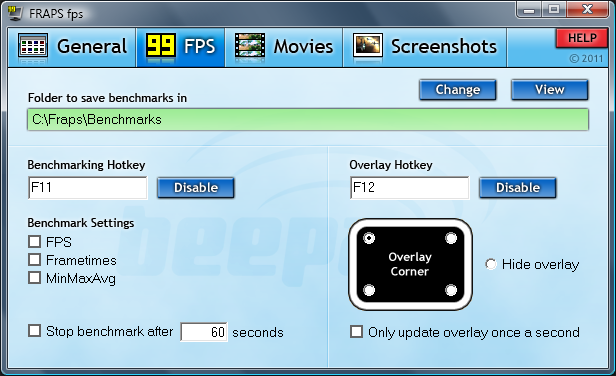
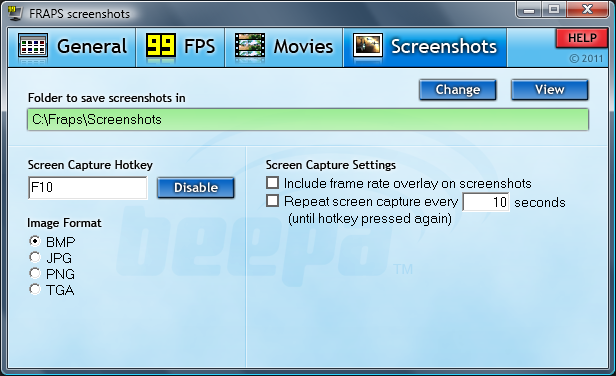
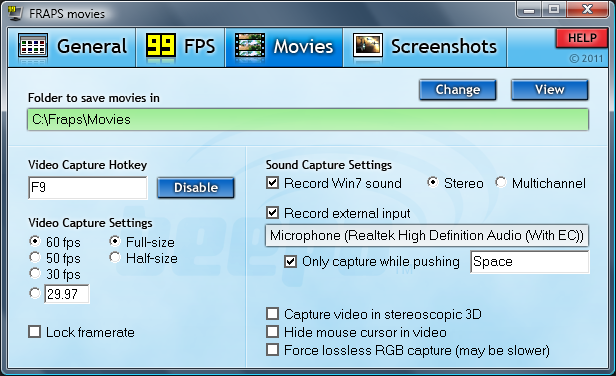

Fraps is a Windows utility for monitoring game performance, taking screenshots and recording gameplay in applications that use DirectX or OpenGL graphics. It is aimed at players who want to check frame rates, keep evidence of benchmark results or create game footage, as well as reviewers who need repeatable measurements and captures. Its functions are available through keyboard shortcuts and an on-screen frame-rate display, so common capture tasks can be handled while a game is running.
The frame-rate counter shows the current frames per second (FPS) in a screen corner, making it possible to observe performance during play without leaving the application. For more deliberate testing, Fraps can run custom benchmarks and measure frame rate between two selected points. It can save the resulting statistics to disk for later comparison or use in reviews and other applications. These tools help users examine how a game performs across a scene or compare results from different settings, while keeping the measurements separate from the visual recording.
For still images, a chosen key captures the screen directly. Fraps automatically names and timestamps the resulting screenshots, avoiding the need to copy an image into a separate paint program after each capture. The same in-game workflow is useful for documenting graphics, preserving a moment from play or gathering images for a review. For video, the program records gameplay in real time with audio, with configurable frame rates from 10 to 100 frames per second and capture resolution up to 2560 × 1600.
The combination of an FPS overlay, timed benchmarks, screenshots and video recording makes Fraps useful for both performance checks and gameplay documentation. A reviewer can measure a section of a game, save the statistics and capture images or footage from the same session; a player can record a scene without using an external camera or separate editing capture device. Its focus is on capturing and measuring activity in supported graphics applications rather than general-purpose desktop editing.
Fraps is distributed as demo software. Its stated Windows compatibility includes Windows 2000, Windows XP, Windows Vista, Windows 7, Windows 8 and Windows 10, including the specified 64-bit editions of Vista, 7, 8 and 10. The program is intended for Windows computers running DirectX- or OpenGL-based games and applications.