Pixia
Pixia is a freeware graphics editor by Isao Maruoka for creating digital paintings, drawing illustrations and editing images. Its range of painting and image tools makes ...

FXCartoonizer converts photographs into cartoon-style images and drawings through an automated process that does not require manual drawing. It includes tools to crop and resize photos, adjust brightness and contrast, and add items before or after applying the effect. Use it to make illustrated portraits, pet pictures, family images, or artwork for profile images and keepsakes. The standalone program works offline and supports 32-bit and 64-bit systems.
| Author: | Convertdaily |
| License: | Shareware |
| Price: | $29.95 |
| Released: | Sep 1, 2017 |
| File size: | 51.43 MB |
| Downloads: | 326 |
| Keywords: | photo editing software, FXCartoonizer, cartoonize yourself pc, cartoon drawing effect, photo to cartoon software, FX Cartoonizer, cartoonize photos, cartoon portrait maker, cartoon yourself pc, cartoonize yourself windows, cartoon effects, cartoon yourself windows, offline photo cartoonizer, image editing, user-friendly interface, Windows 10 compatible, Convertdaily |
| Author URL: | http://www.convertdaily.com |
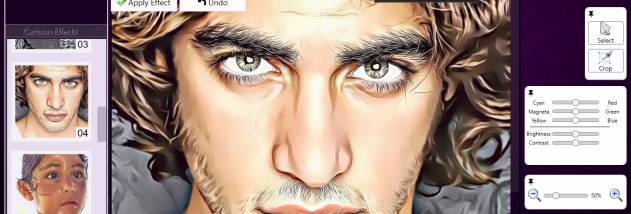

FXCartoonizer is a Windows image-editing program for turning photographs into cartoon-style images and drawings. It is intended for people who want to create illustrated versions of portraits, family pictures, pets, places, or event photos without drawing by hand. The conversion is automated, so the process does not require artistic skills: open an image, apply the cartoon effect, and review the result.
The program transforms images by simplifying areas into solid color patterns and converting finer details into a cartoon treatment. This approach can be applied to large or high-quality photos as well as everyday images. FXCartoonizer also provides editing tools for preparing a picture before conversion or refining it afterward. Cropping removes unwanted edges or focuses attention on a subject, while resizing adjusts image dimensions for a particular use. Brightness and contrast controls help correct the appearance of a photo or tune its look before saving the cartoon version.
Additional options include adding items to an image and applying effects across the photo. The workflow keeps image conversion and basic adjustments together in a standalone desktop application, without requiring an internet connection. Finished cartoons can be used as profile images or shared in place of a personal photograph. They can also provide illustrations for family keepsakes, event collections, holiday memories, mugs, T-shirts, and other creative projects. The software can process pictures of people, animals, homes, neighborhoods, and other subjects.
FXCartoonizer is shareware from Convertdaily and is available in English. It supports 32-bit and 64-bit systems. The supplied operating-system information includes Windows 10, along with earlier Windows releases; Windows 11 is not listed. As a standalone program, it does not need an internet connection for its image-conversion workflow. Its combination of automatic cartoon effects and straightforward photo adjustments is suited to casual users who want a stylized result without using manual drawing tools.