Mat
... to the download page for Mat, a powerful Windows 10 software developed by Skwire Empire. Mat is a versatile and user-friendly application designed to enhance ...

GPU-Z is a lightweight utility for identifying graphics hardware and checking its specifications and sensor readings. It supports NVIDIA, AMD, ATI and Intel graphics devices, and can display adapter, GPU and monitor details for each card in a multi-GPU system. Users can inspect current, default and 3D clock speeds, monitor GPU temperature and used memory, test PCI Express lane configuration, validate results and back up a graphics card's BIOS. It runs without installation, with an installer also available.
| Author: | techPowerUp |
| License: | Freeware |
| Price: | FREE |
| Released: | Apr 19, 2024 |
| File size: | 6.90 MB |
| Downloads: | 1262 |
| Keywords: | gpu temperature monitor, gpu information utility, video card, GPU-Z, NVIDIA, graphics card analysis, graphics card sensor monitor, pci express lane test, techPowerUp, ATI card info, hardware monitoring, gpu bios backup, Windows 10 software, graphics card details, NVIDIA card info, x64 application, video card info, card info |
| Author URL: | http://www.techpowerup.com/ |

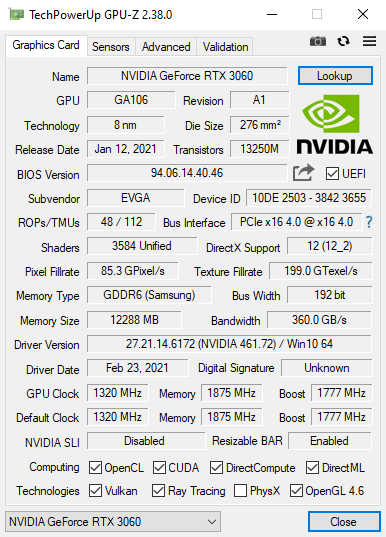



GPU-Z is a lightweight graphics-card information utility for PC users who want to identify their graphics hardware, inspect its specifications or monitor its sensors. It supports NVIDIA, AMD, ATI and Intel graphics devices, and can show information for each card when a system has more than one GPU. Its focused interface is useful for routine hardware checks as well as troubleshooting and performance testing.
The program displays details about the graphics adapter, GPU and connected display. Users can check identification and configuration data alongside clock speeds, including current, default and 3D clocks when available. Sensor readings provide a way to keep an eye on values such as GPU temperature and used memory while a graphics workload is running. GPU-Z also reports other available graphics-card data, helping users compare operating conditions with the card's specifications.
For system checks, GPU-Z includes a GPU load test that can help verify the PCI Express lane configuration. Results can be validated, and the utility can save a backup of a graphics card's BIOS. It also supports technologies including OpenCL, CUDA, PhysX and DirectCompute, making it relevant when checking hardware capabilities used by graphics applications and compute workloads. The software presents information rather than serving as a general graphics driver or a full system-monitoring suite.
GPU-Z can help identify a card before installing software, check sensor behavior during a game or other demanding task, and gather hardware details when diagnosing a display or performance issue. On multi-GPU systems, users can switch between the available graphics devices to inspect their respective data. The application is designed to run without installation, with an installer also available.
GPU-Z is freeware for personal and commercial use. Redistribution as part of a commercial package is not permitted. It is available for Windows, including Windows 10 and Windows 11, and supports both 32-bit and 64-bit editions according to its stated compatibility. Hardware readings and available fields depend on the graphics device and the data it exposes.