MSI Afterburner
... on-screen display. Monitoring history can be logged in RivaTuner hardware monitoring log format, which helps users review changes during a gaming session or performance test. ...

RivaTuner is a graphics-card tuning utility for NVIDIA GeForce and supported ATI Radeon adapters. It provides driver-level Direct3D and OpenGL settings, per-application profiles, low-level hardware access, diagnostics and real-time monitoring. Advanced users can also work with its registry editor and patch-script engine to configure supported graphics hardware.
| Author: | Alex Unwinder |
| License: | Freeware |
| Price: | FREE |
| Released: | Aug 23, 2009 |
| File size: | 2.70 MB |
| Downloads: | 618 |
| Keywords: | geforce, nvidia geforce tweaking, Windows 10 compatible, nvidia, per application graphics profiles, Alex Unwinder, x64 software, ati radeon tuning tool, RivaTuner, graphics card tuning utility, system monitoring, Riva Tuner, GPU overclocking, direct3d driver settings, performance, gpu hardware monitoring, geforce tweak, nvidia tool, video tweak |
| Author URL: | http://www.guru3d.com/ |
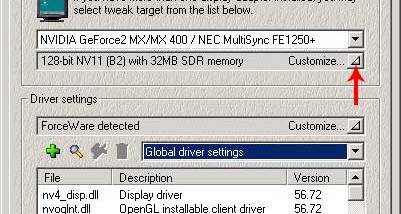

RivaTuner is a graphics-card tuning utility for users who want detailed control over NVIDIA GeForce and supported ATI Radeon display adapters. It combines driver-level configuration with low-level hardware access, letting experienced users adjust graphics behavior beyond the basic options in standard display settings. Its broad range of controls is intended for troubleshooting, performance experimentation and per-program configuration rather than casual desktop use.
Driver-level options cover Direct3D and OpenGL, allowing users to tune graphics settings through the installed driver. A profiling system can associate custom settings with individual applications, so a game or other graphics program can use its own configuration instead of relying on one global setup. This is useful when different programs respond differently to driver settings, and makes it possible to switch settings according to the application being launched.
RivaTuner also includes diagnostic tools and real-time hardware monitoring. These features help users inspect graphics-adapter behavior while testing a configuration or running a demanding application. Its low-level access mode provides another route to hardware controls, while built-in registry editing and a patch-script engine serve advanced users who need to make or apply system-level adjustments. The combination supports both direct tuning and observation of how changes affect the adapter.
Typical uses include creating separate graphics profiles for games, investigating driver or rendering issues, monitoring a GPU under load, and adjusting supported hardware for performance experiments. The utility supports NVIDIA adapters from the Riva TNT family through GeForce generations, alongside a wide range of NVIDIA drivers. It also works with display adapters based on newer ATI graphics processors; ATI support includes the features other than driver-level tuning options.
RivaTuner is freeware and is intended for Windows systems. Its stated operating-system support extends through Windows 10, including 64-bit editions; Windows 11 support is not established here. The utility exposes low-level settings that can affect graphics stability, so changes are best made deliberately and tested with the applications and hardware in use. It is primarily suited to users familiar with graphics drivers and hardware tuning.