Windows Logon Notifier
Windows Logon Notifier is a small utility for creating a message that appears during the Windows logon process. It is intended for administrators and other users who want to present a ...

gsudo is an open-source Windows command-line utility for running commands with administrator privileges from an existing terminal session. It works with Command Prompt, PowerShell and Windows Terminal, and can also launch graphical applications with elevated rights. Credential caching and a configurable timeout help manage repeated authorization prompts. It is designed for developers, system administrators and power users handling maintenance, software installation or system configuration.
| Author: | Gerardo Grignoli |
| License: | Open Source |
| Price: | FREE |
| Released: | Oct 6, 2025 |
| File size: | 5.70 MB |
| Downloads: | 141 |
| Keywords: | gsudo, download gsudo, user-friendly, sudo privilege, powershell administrator commands, administrator privilege, windows sudo alternative, security, terminal, command elevation tool, gsudo free download, privilege, administrator, elevated, elevated command prompt, productivity, elevation, elevated command, elevated privilege, gsudo command line utility, run command as administrator, command-line, sudo, Windows, open-source |
| Author URL: | https://github.com/gerardog/gsudo |


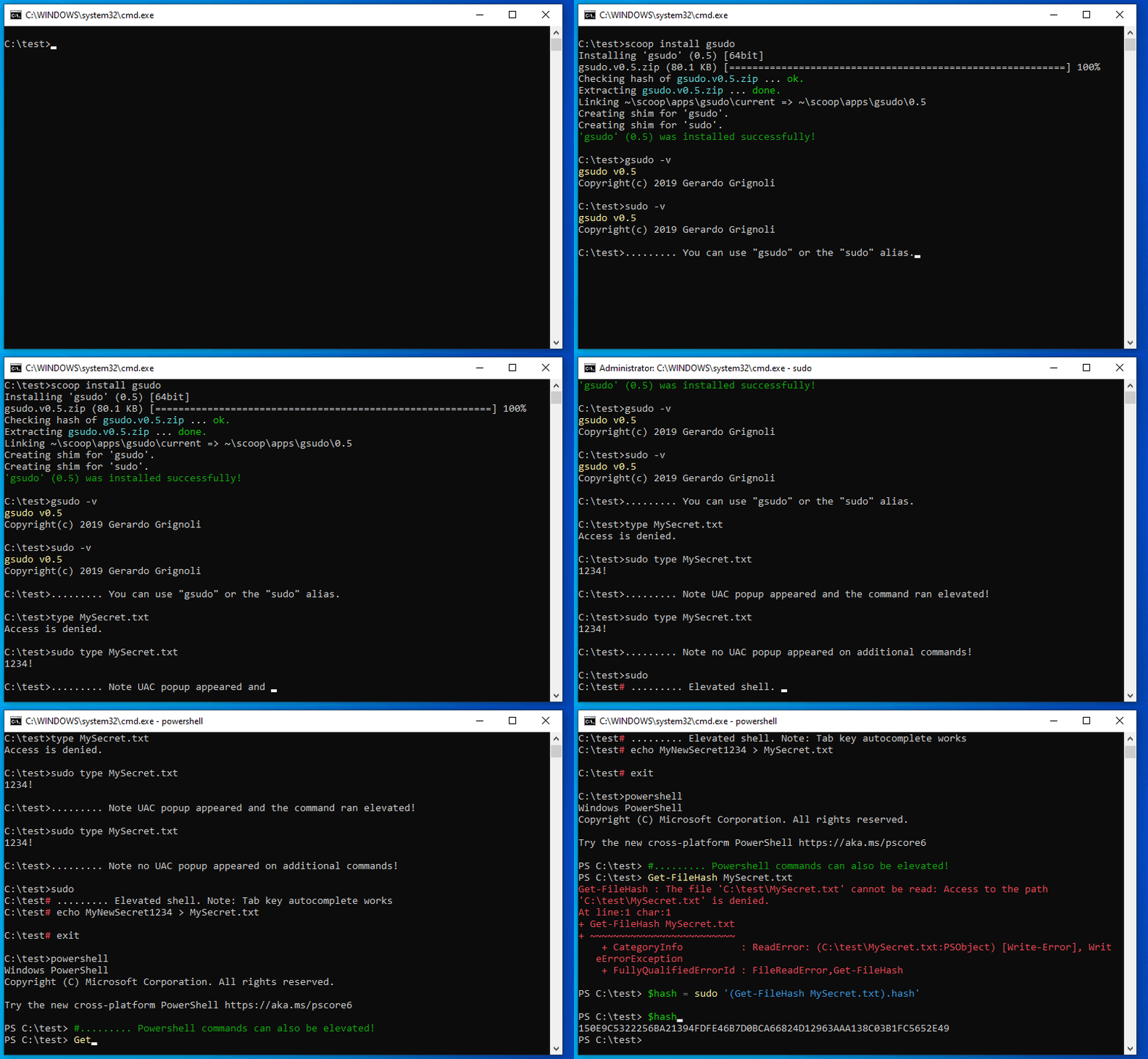

gsudo is an open-source command-line utility for Windows that lets users run commands with administrator privileges from an ordinary command prompt. It is useful to developers, system administrators and experienced Windows users who need elevated access for maintenance or configuration but want to stay in their current terminal session. Rather than opening a separate administrator window for every task, they can prefix a command with gsudo to request elevation when needed.
The utility works with Command Prompt, PowerShell and Windows Terminal, so the same approach can be used across common Windows command-line environments. For example, a user can invoke a command that installs software, changes a system setting or accesses a protected file by adding gsudo before it. This keeps the command and its elevated execution in the same workflow, while the underlying task remains the responsibility of the command being run.
gsudo can also launch graphical applications with elevated permissions from the command line. This is helpful when an administrative tool or installer must be opened with higher privileges, but the user prefers to start it from a terminal rather than locate and reopen it through the desktop. Credential caching can reduce repeated authorization prompts during a session, and its timeout can be configured to control how long cached credentials remain available. These options let users choose between fewer interruptions and more frequent authorization.
Typical uses include running administrative scripts, performing system maintenance, installing or configuring software, and opening tools that require administrator access. Because gsudo provides a way to request elevation as part of a command, it can fit into existing terminal habits and scripts without requiring users to switch to a separate elevated shell for each operation. Users should still review the commands they run with elevated rights, since those commands can make system-wide changes.
The program is open source and free to use. It supports Windows 10 and Windows 11, as well as Windows 8, with 32-bit and 64-bit editions listed for Windows 10 and 8. gsudo is a command-line tool rather than a graphical replacement for Windows account controls; its practical value is in simplifying administrator-level work from supported terminal applications.