NaroCAD
NaroCAD is an open-source 3D CAD application for users who need to create and edit ... includes general CAD functions such as saving and importing, supporting work with both ongoing projects and existing ...

HeeksCAD is a free, open-source CAD application for 2D drawing and 3D solid modeling. It imports STEP, IGES, and DXF files, supports constrained sketches, and creates solids from primitives, extrusions, or lofts. Users can modify models with blending and boolean operations, then save as STEP, IGES, or STL. It also supports plotting 2D geometry and HPGL output.
| Author: | Dan Heeks |
| License: | Open Source |
| Price: | FREE |
| Released: | Oct 5, 2016 |
| File size: | 10.00 MB |
| Downloads: | 579 |
| Keywords: | HeeksCAD, x64 software, Windows 10, free cad software, construction, import solid model, constrained sketch cad, CAD application, step iges viewer, 3d solid modeling, Dan Heeks, draw, open source cad, dxf drawing tool, draw construction geometry, Open-source software, CAD program, import |
| Author URL: | http://code.google.com/p/heekscad/ |
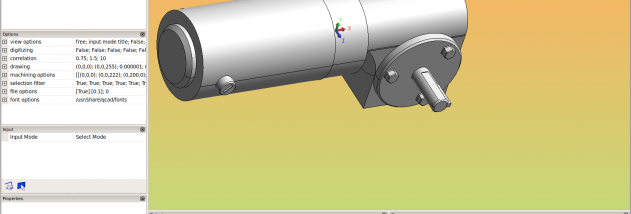

HeeksCAD is a free, open-source computer-aided design application for creating and editing 2D geometry and 3D solid models. It is suited to designers, makers, and technical users who need to build shapes from sketches, work with imported engineering files, or prepare geometry for further CAD and manufacturing workflows. Its tools cover both precise construction drawing and solid modeling, with a geometric constraints solver to help turn rough sketches into accurately dimensioned geometry.
For 2D work, HeeksCAD can create construction geometry, lines, and arcs, and supports common entities such as ellipses, splines, and polylines through its DXF import and export tools. The constraints solver applies geometric relationships to a drawing, helping keep elements aligned or otherwise accurately defined as the sketch is refined. This makes it possible to start with approximate outlines and use constraints to produce more controlled technical drawings. Completed 2D geometry can be printer-plotted or output as HPGL for compatible plotter workflows.
The 3D tools allow users to create primitive solids or build solids from sketches. A sketch can be extruded into a solid, or two sketches can define the ends of a lofted shape. Existing solids can also be modified with blending and boolean operations, which combine or cut shapes to form more complex models. HeeksCAD imports solid models in STEP and IGES formats, making it useful for continuing work on geometry created in other CAD applications. Finished models can be saved as STEP, IGES, or STL files for exchange with other software or use in downstream fabrication workflows.
A typical workflow might begin by importing a STEP or IGES model, adding or adjusting geometry, and then exporting the result in a format appropriate for another CAD tool or manufacturing process. Alternatively, a user can draw and constrain a 2D sketch, turn it into a solid through extrusion or lofting, and refine the model with blending or boolean operations. DXF support also provides a route for exchanging 2D drawings with applications that use that format. The application's translation support includes English, German, and Italian, and its open-source license allows it to be used without a purchase price.
HeeksCAD has been built for Windows and several Linux distributions, including Ubuntu, Debian, and OpenSUSE. The provided Windows compatibility information extends through Windows 10, including 64-bit editions; Windows 11 compatibility is not established here. The download is approximately 10 MB. Its mix of 2D drafting, constrained sketches, solid modeling, and standard exchange formats makes it most relevant to users seeking a compact CAD tool for technical drawings and basic-to-intermediate model construction.