ID Photo Creator
Welcome to the download page for ID Photo Creator, a cutting-edge software developed by AMSA Software exclusively for Windows 10 users. With ID Photo Creator, capturing and creating professional-quality ID photos has ...

IdPhotos Pro prepares identity and passport photos using templates for sizes and resolutions used in regions around the world. Guided cropping helps center facial features, while biometric checks flag lighting, position or expression that could affect scanning. Color-balance controls support natural-looking skin tones. Password protection and automatic photo deletion help manage stored portraits.
| Author: | PIXEL-TECH |
| License: | Demo |
| Price: | $249.00 |
| Released: | Oct 9, 2026 |
| File size: | 85.80 MB |
| Downloads: | 478 |
| Keywords: | biometric ID photos, Windows 10 software, passport, ID photo designer, photo editor, PIXEL-TECH, designer, professional photo editing, x64 application, id photo software, identity photo editor, ID photo, passport photo maker, employee id photo, photo crop templates, IdPhotos Pro, passport photo, biometric photo check |
| Author URL: | http://www.idphotos.pixel-tech.eu/ |
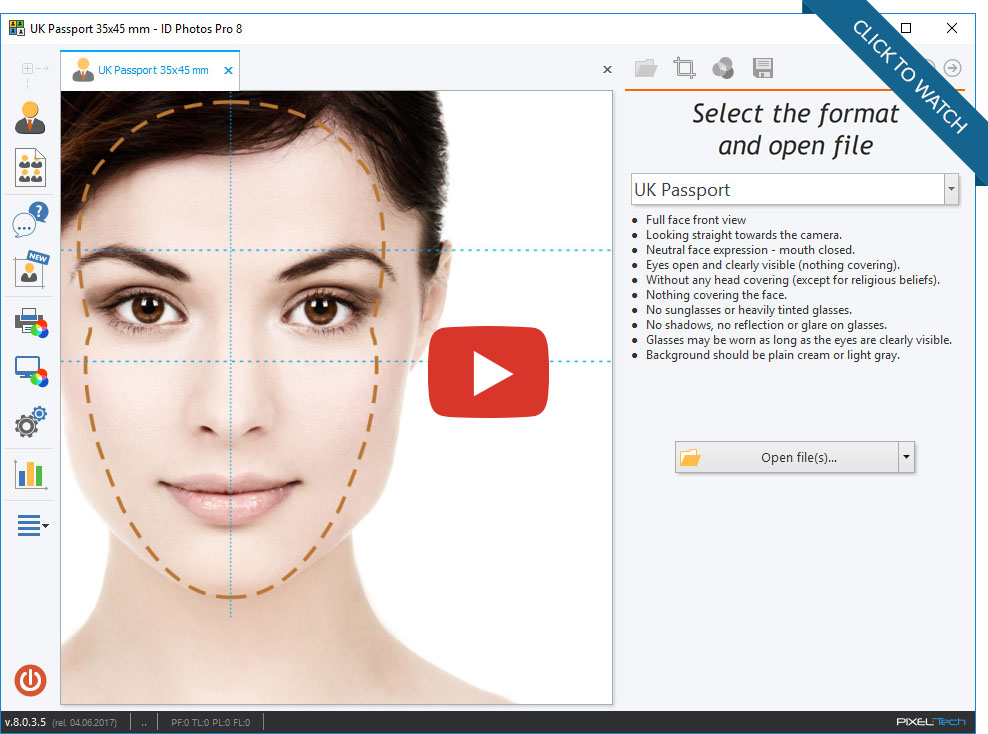



IdPhotos Pro is a Windows application for preparing identity and passport photos, intended for photo services, organizations and businesses that produce portraits for official documents or employee cards. It combines photo layout tools with checks that help assess whether an image is suitable for biometric identification. This gives operators a structured way to prepare repeatable photo sets rather than relying on manual cropping alone.
The program includes templates for ID-photo sizes and resolutions used in regions around the world. An operator can select an appropriate format and use the on-screen cropping guide to position the subject's face centrally, keeping key facial features visible for automated scanning. Biometric checks assess image factors such as lighting, head position and facial expression, highlighting conditions that may interfere with recognition and may call for another photograph.
Editing tools help refine the prepared image before it is printed or used in a document workflow. Color-balance adjustments can be applied to the monitor image and the photo to help reproduce natural-looking skin tones. These controls are useful when a portrait needs correction while retaining a clear, recognizable likeness. The templates and guided crop also support consistent output across multiple photos, reducing repetitive adjustment when an organization processes portraits in batches.
IdPhotos Pro can support photo studios handling identity-photo requests as well as government offices and corporate logistics teams creating staff cards. For employee badges, a consistent crop and image format can help prepare portraits for cards used with biometric-based access scanners. Its automated image checks provide a practical review step, while the editing and template tools keep the photo-preparation workflow in one application.
The program is offered as a demo and supports Windows 10 (32-bit and 64-bit) and Windows 11. It includes password protection and automatic photo deletion after a configurable number of days, helping manage stored portraits. Users should choose a template that matches the issuing authority's current requirements, since acceptable photo dimensions and presentation can differ by document type and region.