SSI Model Railway Control System
SSI Model Railway Control System is a railway signalling and layout-control program for model railway operators who want to manage trains through a computer interface ...

iTrain controls digital model railways from a Windows computer. It can run several trains, automate routes and timetables, and display train positions, track occupancy and signal states on a visual layout. Hobbyists can configure locomotive profiles and track elements, control accessories such as turnouts, and switch to manual driving with a joystick or handheld controller.
| Author: | Xander Berkhout |
| License: | Demo |
| Price: | $139.00 |
| Released: | May 4, 2026 |
| File size: | 29.10 MB |
| Downloads: | 354 |
| Keywords: | controller, digital train controller, train route control, railroad, track route, iTrain software, model railroad layout control, railway timetable software, Xander Berkhout, intuitive user interface, Windows 10 compatible, tracker, manage railroad, railroad controller, model railway control, model train automation, advanced automation features, model railway control software |
| Author URL: | https://www.berros.eu/ |
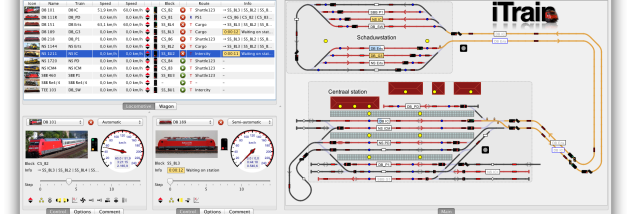



iTrain is a Windows program for controlling digital model railways. It is intended for hobbyists who want to monitor and operate a layout from a computer, whether they prefer to drive trains manually or automate movement across the track. A visual representation of the railway helps operators relate software controls to the physical layout and keep track of activity as trains run.
The software can manage several trains at once and automate their operations. Users can create timetables and routes so trains follow planned sequences, reducing the need to control every movement individually. For layouts divided into blocks, the interface shows train positions and track occupancy, helping operators understand which sections are in use. Signal states are also visible, providing a convenient overview while trains move around the layout.
A track-plan view presents the layout graphically, while block diagrams offer another way to inspect its organization and current state. Locomotive profiles and track elements can be configured to match a particular railway, and iTrain can control accessories such as turnouts and signals. Sensors can contribute information about activity on the track. These options let hobbyists adapt the control setup to their own arrangement rather than relying on a single fixed layout design.
Manual operation is available alongside automation. Operators can take direct control when testing a route, positioning a train or simply driving it themselves. Support for joysticks and handheld controllers provides alternatives to using the computer interface for these tasks. Combining manual driving with scheduled and automated movement makes the program useful both during layout development and for running an established railway.
iTrain is offered as a demo and runs on Windows 10 and Windows 11, including 32-bit and 64-bit Windows 10 systems. It is designed for digital model railway control, so its practical use depends on having a compatible control system and configuring the software for the layout and connected devices. The interface brings train operation, layout monitoring and accessory control together in one workspace.