
Moo0 ImageInColors

Moo0 ImageInColors 1.25

Convert images into different color tones

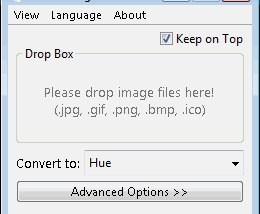
Moo0 ImageInColors is a Windows utility for converting images into different color tones. Users drag image files onto the application to create alternate looks, making it useful for comparing color choices during design work or preparing a photo with a different visual mood. It focuses on tone conversion rather than full image editing and is offered as freeware.

Moo0 ImageInColors 1.25 details

Author:
License: Freeware
Price: FREE
Released:
File size: 2.70 MB
Downloads: 162
Keywords: Moo0 software review, user-friendly interface, convert image colors, photo tone converter, image color conversion, image editing software, image color tone converter, picture conversion, convert photo, image converter, convert, photo, color tone design tool, converter, drag and drop image converter, Moo0 ImageInColors, Windows 10 compatible
Author URL: https://www.moo0.com/
Moo0 ImageInColors screenshot
Moo0 ImageInColorsConverters & OptimizersWindows XP, Windows Vista, Windows Vista x64, Windows 7, Windows 7 x64, Windows 8, Windows 8 x64

User Rating: 0 (0 votes)

Windows 10

x32

Windows 10

x64

Moo0 ImageInColors Awards

Windows 10 download editor's pick

Moo0 ImageInColors for Windows 10 - Full description

Moo0 ImageInColors is a small Windows utility for creating alternate color-tone versions of images. It is intended for people who need to compare how a picture looks with different tones, particularly during visual design work when choosing a color direction. Rather than focusing on detailed image editing, the program centers on changing the color appearance of an existing image.

The main workflow uses drag and drop: image files are dragged onto the application to begin working with them. This keeps the process direct for quick experiments, such as checking possible tones for a design asset or preparing variations of a photo. The converted result can help with comparing visual options without requiring a full-featured graphics editor for this focused task.

Color-tone conversion is useful when the original image content should remain recognizable while its overall color treatment changes. Designers can use the variations to assess which tone suits a layout, concept, or other visual material. The utility can also serve for straightforward photo conversion when a different color mood is needed, without making broader editing tools the focus.

Moo0 ImageInColors is freeware. Its compact download and narrow purpose make it a simple option for occasional image-tone experiments as well as a lightweight addition to a design workflow. The available operating-system information covers older Windows releases, so compatibility with newer Windows versions should be checked before installation. The program's stated workflow is based on dropping files onto the application; no particular image formats or advanced editing controls are established here.

Moo0 ImageInColors for Windows 10 - Post your review