Vov Text to Image Converter
... of text transformation with Vov Text to Image Converter, a unique software developed by VOVSOFT. This Windows 10 compatible software is a must-have for anyone looking to convert ...

Adobe DNG Converter turns raw files from many popular cameras into Digital Negative (DNG), a publicly documented raw-image format. Users select a source folder and destination, then convert photographs in batches instead of exporting files one at a time. DNG can help standardize a multi-camera workflow and make raw images accessible to compatible Adobe and third-party applications. Conversion preferences support different DNG compatibility needs. The free utility runs on 64-bit Windows 10 and Windows 11.
| Author: | Adobe |
| License: | Freeware |
| Price: | FREE |
| Released: | Oct 16, 2026 |
| File size: | 1740.80 MB |
| Downloads: | 1984 |
| Keywords: | converter, Adobe DNG Converter, adobe dng converter, dng photo workflow, raw photo, RAW image processing, Windows 10 compatible software, dng, convert camera raw files, digital negative conversion, raw to dng converter, digital negative converter, dng converter, Adobe Systems, raw photo archive, raw photo converter, dng creator, image file converter |
| Author URL: | https://acrobat.adobe.com/us/en/acrobat/pdf-reader.html |


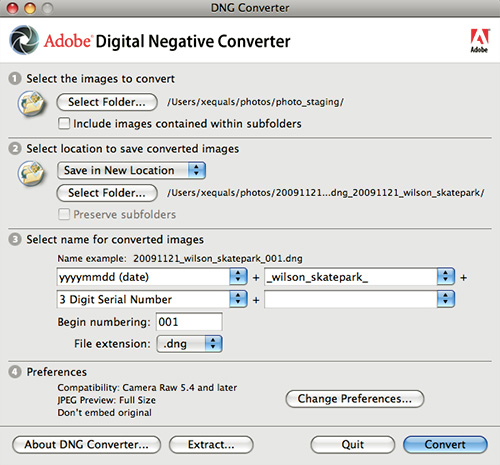



Adobe DNG Converter is a desktop utility for photographers who want to convert camera-generated raw files into Digital Negative (DNG), Adobe’s publicly documented raw-image format. Camera makers use different proprietary raw formats, and support for a particular format can vary between photo applications. Converting files to DNG can make them easier to manage in workflows that use software with DNG support and provide an alternative to keeping camera-specific files as the only archive copy.
The converter works with raw files from many popular cameras. A photographer selects a folder containing source images, chooses where the converted files should go, and starts the conversion. Processing a folder makes it practical to handle a group of photographs rather than opening and exporting each image individually. The original raw files can be kept separately, allowing the DNG copies to fit into an existing backup or editing workflow without replacing the camera originals.
Conversion changes the file container and representation to DNG; it is not an image-editing application for retouching photographs or making creative adjustments. DNG retains raw image data for later processing in compatible software, where exposure, white balance, and other image settings can be adjusted. Conversion preferences include options for compatibility with different DNG-reading applications, and the format can carry metadata and previews alongside image data. The DNG specification is publicly available, which helps software developers implement support beyond Adobe’s own products.
The utility is useful when photographs need to move between applications, when a photographer wants a consistent raw-file format across cameras, or when building an archive that is less dependent on an individual camera maker’s proprietary format. DNG files can be used by compatible Adobe applications and by other programs that support the format. Conversion does not guarantee that every application will interpret every camera’s files identically, so a sample image should be checked in the intended editing software before a large archive is converted.
Adobe DNG Converter is freeware for 64-bit Windows 10 and Windows 11. Camera raw support depends on the input camera and the converter’s available support for its files; photographers should confirm that their camera’s raw format is recognized before relying on a conversion workflow. Keeping original files and backups remains a sensible precaution for long-term storage.