
NVIDIA Inspector

NVIDIA Inspector 2.4.0.4

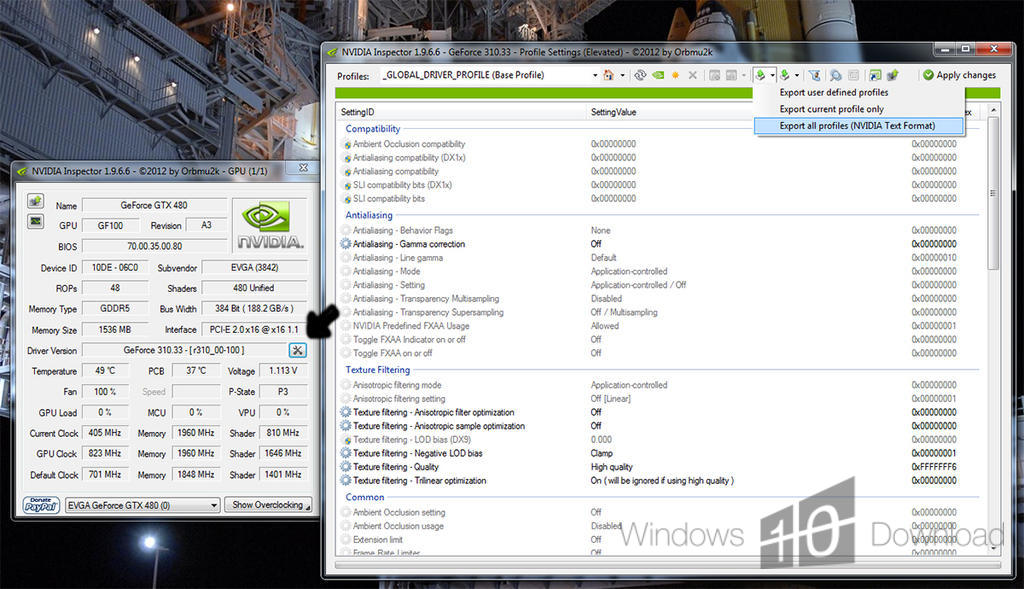
GeForce information and overclocking controls

NVIDIA Inspector is a free Windows utility for checking hardware and driver information on NVIDIA GeForce graphics cards. It also provides controls for GPU and memory clocks, operating voltage and fan speed, making it useful for users who want to inspect their card or adjust its settings. The program relies on NVIDIA drivers and requires .NET Framework 2 or later.

NVIDIA Inspector 2.4.0.4 details

Author:
License: Freeware
Price: FREE
Released:
File size: 143 kB
Downloads: 569
Keywords: nvidia graphics card information, nvidia driver information, Graphics, graphics card fan control, Overclock Graphic Card, GPU monitoring, Overclock, geforce hardware monitor, gpu overclocking tool, nVidia, overclocking tool, NVIDIA Inspector, Graphics Card Info, nVidia Info, Orbmu2k, driver tweaking software, Windows 10 compatible, adjust gpu clock speed
Author URL: http://blog.orbmu2k.de/
NVIDIA Inspector screenshot
NVIDIA InspectorOtherWindows XP, Windows Vista, Windows Vista x64, Windows 7, Windows 7 x64, Windows 8, Windows 8 x64, Windows 10, Windows 10 x64

User Rating: 0 (0 votes)

Windows 10

x32

Windows 10

x64

NVIDIA Inspector Awards

Windows 10 download editor's pick

NVIDIA Inspector for Windows 10 - Full description

NVIDIA Inspector is a free utility for users who want to inspect and adjust NVIDIA GeForce graphics cards. It reads hardware and driver information and provides access to GPU overclocking controls in a compact Windows application. It is intended for users who want more detail about their graphics hardware or who are comfortable changing clock and fan settings.

The information view gathers details about the graphics card and its driver, helping users identify the installed hardware and check its reported characteristics. This can be useful when comparing system configurations or checking which NVIDIA card and driver are in use. The program relies on NVIDIA drivers to access the card and display its information.

For tuning, NVIDIA Inspector offers controls for GPU and memory clock speeds, operating voltage and fan speed. Users can adjust these settings to explore performance or cooling changes, then observe how the card behaves. Such adjustments can affect temperature, stability and power use, so changes are best made cautiously and tested under the workloads for which the system is used.

The interface keeps its information and tuning tools in one lightweight utility, rather than serving as a general-purpose graphics management suite. It is aimed specifically at NVIDIA graphics hardware; it is not intended for configuring graphics cards from other manufacturers. The program is freeware and requires .NET Framework 2 or later. It supports Windows versions through Windows 10, including 64-bit editions where listed.

NVIDIA Inspector for Windows 10 - Post your review