FFT-z
Welcome to the home of FFT-z, an innovative software developed by the brilliant Zdravko Stoychev, designed to elevate your Windows 10 experience. FFT-z is a robust, ...

OCCT combines PC benchmarking, stress testing and live hardware monitoring for Windows users. Its tests measure single- and multi-threaded CPU performance and memory read and write speeds, with results shown alongside leaderboard comparisons. Configurable component stress tests use graphs and tables to show system behavior under load. Real-time readings include CPU and GPU temperatures, clock speeds and power draw, making the utility useful for checking overclock settings or investigating performance and thermal behavior.
| Author: | OCCT |
| License: | Shareware |
| Price: | FREE |
| Released: | Oct 16, 2026 |
| File size: | 197.00 MB |
| Downloads: | 492 |
| Keywords: | RAM, test CPU, monitor CPU, gpu stress test, PC stress testing, monitor, temperature monitoring, x64 compatibility, system stability test, memory benchmark, pc stress test, OCCT software, hardware diagnostic tool, hardware monitoring, monitor RAM, occt download, CPU, cpu benchmark |
| Author URL: | https://www.ocbase.com/ |
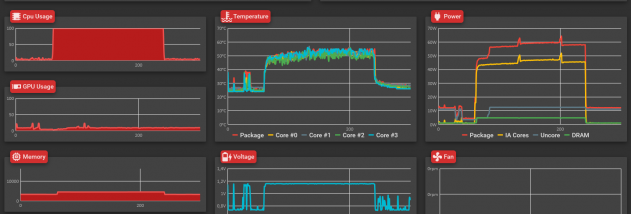

OCCT is a Windows utility for checking PC performance, monitoring hardware and testing system stability. It is aimed at overclockers who need to verify changed settings, as well as users who want to assess component performance or watch temperatures and power use. Its benchmark, stress-test and monitoring tools bring these tasks together in one application, with graphs and tables that help make system behavior easier to follow.
The benchmark tools measure CPU performance in single-threaded and multi-threaded workloads, and test memory read and write speeds. These short assessments provide results that can be compared with leaderboard entries, giving users a reference for how their system performs. Benchmarks can help identify whether a processor or memory configuration is performing as expected, though results depend on the hardware and its settings.
For stability checks, OCCT runs stress tests on PC components. Test parameters can be adjusted before a run, allowing users to configure the workload for their needs. While the test is active, graphs and tables display system information, helping users observe how the computer responds under load. This can be useful after changing clock settings or when investigating instability, but intensive tests place sustained demands on hardware and should be used with care.
The monitoring view is also useful without running a benchmark or stress test. It shows live readings such as CPU and GPU temperatures, clock speeds and power draw, with graphs that make changes over time easier to interpret. Users can watch these readings during ordinary work or while a demanding task is running, then use the displayed information to investigate thermal or performance behavior.
OCCT is available for 64-bit Windows 10 and Windows 11 and is offered as shareware. Its controls are accessible enough for casual checks, while configurable tests and detailed readouts also suit users who want closer control over diagnostics. The portable nature noted for the application can make it convenient to run without treating it as a permanent part of a PC setup. Benchmark comparisons and sensor readings provide useful context, but they are not a substitute for checking component specifications or diagnosing hardware faults with appropriate care.