Heaven Benchmark
Heaven Benchmark is a graphics benchmark and real-time 3D demo built on Unigine's engine. ... hardware enthusiasts and system builders who want to test a graphics card under a demanding rendering workload ...

Opti Drive Control tests and benchmarks optical drives using CD, DVD and Blu-ray media. It measures read and write transfer rates, verifies burns and runs disc-quality checks such as BLER, PI/PO, C1/C2 and jitter where supported. Test sequences can run unattended, with results saved as HTML reports and graphs exported to CSV for spreadsheet analysis. It also provides drive and disc information, plus erase, format and overburning functions.
| Author: | Erik Deppe |
| License: | Trialware |
| Price: | $24.95 |
| Released: | Jan 14, 2020 |
| File size: | 3.40 MB |
| Downloads: | 251 |
| Keywords: | CD/DVD/Blu-Ray analysis, benchmark, Opti Drive Control, x64 software, test, read write transfer rate, drive testing tool, Windows 10 compatible, optical drive tester, disc quality test, Erik Deppe, test optical drive, optical drive test, cd dvd blu-ray testing, optical drive benchmark, tester, burn verification tool |
| Author URL: | http://www.optidrivecontrol.com |
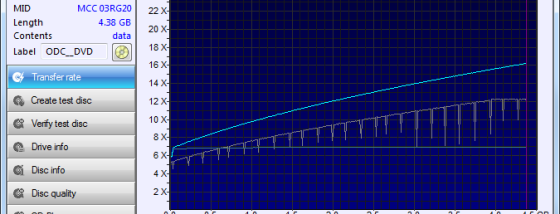

Opti Drive Control is a diagnostic and benchmarking utility for people who need to assess the performance and disc-writing quality of optical drives. It works with CD, DVD and Blu-ray media, providing tests for both reading and writing. Its results can help users compare drives, check whether a burn is readable and investigate problems with optical media.
The program measures read and write transfer rates and can create test discs for verification. Disc-quality tests include BLER, PI/PO, C1/C2 and jitter measurements, while FE/TE testing checks additional characteristics supported by some drives. These tests offer different ways to examine recording quality; availability depends on the optical drive, and not every model supports every measurement. Drive and disc information views provide further details when reviewing hardware or media.
Opti Drive Control also includes functions for erasing or formatting rewritable discs and testing overburning. Its multi-test feature can run a sequence of supported functions without user intervention, which is useful for repeatable checks or examining several discs. Results can be saved as HTML reports, and test graphs can be exported to CSV for closer analysis in spreadsheet software. Enhanced save options help retain test data for later comparison.
The utility is suited to users who maintain optical drives, evaluate blank media, verify archived discs or compare reading and burning behavior. A test disc can help check a completed burn, while transfer-rate and quality results can reveal differences between media or drive settings. Automated test runs reduce the need to start each available test separately, and exported data can be organized alongside other measurements.
Opti Drive Control is trialware. It is designed for Windows and supports CD, DVD and Blu-ray drives and media; individual tests depend on drive capabilities. The program is most useful with an optical drive connected and writable or test media available. Results are measurements of the tested drive and disc, so they should be interpreted in the context of the hardware and the specific test being performed.