Macro Toolworks, Free Edition
Welcome to the download page for Macro Toolworks, Free Edition, a powerful automation software developed by Pitrinec Software. This Windows 10 compatible software is a game-changer ...

Perfect Keyboard Professional automates repeated typing and mouse actions across Windows applications. Users can record actions or build macros in a visual editor, then run them with hotkeys, keyboard shortcuts, or text auto-complete triggers. Its macro language supports variables, conditions, loops, and more than 170 commands. It also offers clipboard macros, network sharing, encryption, and a VBA-compatible scripting environment.
| Author: | Pitrinec Software |
| License: | Trialware |
| Price: | $79.95 |
| Released: | Dec 8, 2022 |
| File size: | 28.00 MB |
| Downloads: | 408 |
| Keywords: | Advanced Scripting, Hotkeys Customization, Pitrinec Software, keyboard macro software, macro, eliminate tasks, keyboard shortcut automation, Perfect Keyboard Professional, text expander, assign key-shortcuts, automate repetitive tasks, Automation Software, macro recorder, key-shortcut, macro creator, windows scripting tool, Macro Recording, assign |
| Author URL: | https://www.pitrinec.com/ |



Perfect Keyboard Professional is a Windows macro and text-expansion tool for people who regularly repeat typing or mouse actions. It lets users create macros that can run across Windows applications, helping automate routine work such as entering standard text, carrying out sequences of clicks and keystrokes, or invoking a series of commands. Triggers include keyboard shortcuts, hotkeys, and text shortcuts that expand as users type; the same trigger can be assigned different macros for different applications.
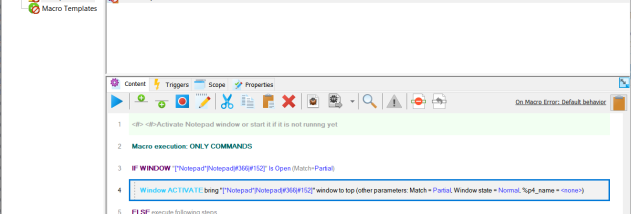
Macros can be built in a visual editor or recorded from keyboard and mouse activity. The editor supports combining keystrokes, clicks, and more than 170 built-in macro commands, while a debugger helps inspect and troubleshoot macro behavior. Playback speed is adjustable, which can be useful when a sequence needs to match an application's response. The macro language includes variables, conditions, loops, expressions, date and time calculations, and procedures for building more involved workflows.
For text-focused tasks, clipboard macros can work with clipboard contents, and auto-complete triggers insert frequently used text. Users can export macro documentation as printable HTML or exchange macros through text-file import and export. Groups can share macros over a corporate network, and a command can call a macro on another computer over the network. Macro files and their contents can be protected with AES encryption; password protection can restrict macro editing or execution. Other commands include file and directory encryption.
The software also includes a Microsoft VBA-compatible Basic Script environment for users who want to create scripts beyond the built-in macro language. Its tools include syntax highlighting, syntax tips, debugging, a dialog editor, DDE and OLE (COM) support, and help with examples. Macros can also be saved as executable MCR files, or packaged for use with the separate free FreeMacroPlayer, allowing other people to run a macro without editing it in Perfect Keyboard Professional.
Perfect Keyboard Professional is trialware for Windows, with support listed for Windows 10 and Windows 11 as well as earlier Windows releases. It is suited to office routines, data entry, repeated form filling, and other tasks involving predictable input across applications. Its broad command set and scripting features serve users who need more than simple text replacement, while recording and visual editing offer a way to start with basic automation without writing a script.