PKF Product Key Finder
Discover the PKF Product Key Finder, a top-tier software solution developed by the ... designed to help you recover and retrieve your product keys for Microsoft Office, Windows, Adobe, and more, ...

Product Key Explorer finds and displays product keys for Windows, Microsoft Office, Adobe Creative Suite, SQL Server and thousands of other software products. It scans the local computer or remote network computers, helping users recover lost keys and administrators track software licenses. Results can be saved as text, Excel, CSV, Access, HTML or XML, printed, or copied to the clipboard.
| Author: | Nsasoft llc |
| License: | Trialware |
| Price: | $29.50 |
| Released: | Jun 8, 2020 |
| File size: | 2.70 MB |
| Downloads: | 581 |
| Keywords: | computers, retrieve, Windows 10, recover key, remote, display product key, windows product key recovery, product key finder, license key, finder, recover software license key, backup, software review, recover, find, Product Key Explorer, exchange key, serial number, x64 compatibility, product key, Nsasoft llc, software license, key finder software, remote product key scanner, export product keys, software key inventory |
| Author URL: | http://www.nsasys.com/ |
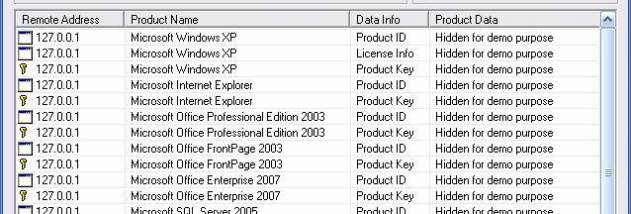

Product Key Explorer is a license-key recovery and inventory utility for people who need to locate software serial numbers on Windows computers. It can scan the local computer or remote network computers for product keys from Windows, Microsoft Office, Adobe Creative Suite, SQL Server and thousands of other software products. This can help an administrator gather keys before reinstalling software or review which licenses are present across a business network.
The program searches installed software for product keys and displays the results in one place, making it easier to find a lost or forgotten serial number. Remote scans let network administrators retrieve keys from other computers without checking each machine individually. The collected information can support license tracking and software compliance reviews by giving staff an inventory of keys found on the computers they manage.
Results can be saved in several formats for record keeping or further review: tab-delimited text, Excel workbook, CSV, Access database, HTML and XML. Product keys can also be printed or copied to the clipboard. These options suit different workflows, from maintaining a spreadsheet to storing structured data or sharing a readable report. A central backup of recovered keys can make them easier to find when software needs to be reinstalled.
Product Key Explorer is intended for home users recovering their own software keys as well as businesses and network administrators maintaining software records. It can be used during computer replacement, system recovery, software reinstallation or an internal license audit. Its results reflect software keys that can be retrieved from the computers scanned; it does not replace an organization's licensing records or determine by itself whether a license is valid.
The software is trialware and is designed for Windows. Supported systems in the supplied compatibility details include Windows XP, Vista, 7, 8 and 10, including listed 64-bit editions of Vista, 7, 8 and 10. Windows 11 support is not established here. Network scans require access to the target computers, and the available export formats provide ways to keep or share the results after scanning.