Notepad!
Notepad! is a freeware text editor for Windows users who want more than the basic Notepad application. It supports everyday text work as well as programming ...

PSPad is a freeware text and source-code editor for programmers and web authors working with multiple languages. It offers syntax highlighting, language templates, code completion and line-manipulation tools, along with a hexadecimal editor. Users can check spelling with a separately downloaded dictionary, search Google from the editor and view HTML pages in its internal browser.
| Author: | Jan Fiala |
| License: | Freeware |
| Price: | FREE |
| Released: | Oct 28, 2026 |
| File size: | 11.80 MB |
| Downloads: | 34 |
| Keywords: | syntax highlighter, html editor, download PSPad, source code editor, hex editor, PSPad free download, text editor, HEX editor, free text editor, IDE, code completion tool, source code, syntax highlighting editor, syntax highlighting, HTML browser, auto-completion, editor, PSPad, Windows code editor, edit |
| Author URL: | https://www.pspad.com/en/ |
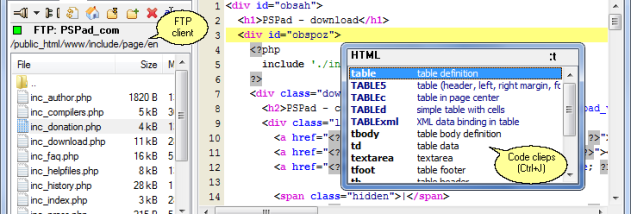


PSPad is a free text and source-code editor for programmers and web authors who work with several languages and want common editing tools in one Windows application. It supports languages including C++, CSS, Fortran, HTML, Java and VBScript, with language-specific syntax highlighting and templates to help organize code as it is written. It also includes a hexadecimal editor for inspecting and editing file data that is not intended to be read as ordinary text.
Language-aware assistance helps reduce the need to remember every function name or syntax detail. PSPad can complete code after a partial entry, and pressing Ctrl+Space opens a list of possible functions. Templates provide starting structures for supported languages, while syntax highlighting makes code elements easier to distinguish during editing. These tools are useful both for drafting new files and for making changes to existing source.
The editor also provides line-manipulation functions for realigning and reusing sections of text or code, which can be more practical than repeatedly copying and pasting when working with long files. A spell-checking feature can identify language errors; it requires a language dictionary downloaded separately. Built-in Google search lets users send queries from within the editor, and an internal browser can display HTML pages without switching to a separate browser application.
PSPad suits developers who edit code in multiple languages, as well as users who handle web pages, scripts, plain text or hexadecimal data. Its combination of syntax highlighting, completion, templates and file inspection tools supports everyday editing without requiring a full development environment. The internal HTML browser is useful for a quick page check, while the search function keeps simple research within the editing workflow.
Jan Fiala distributes PSPad as freeware. It is available for Windows, including Windows 10 and Windows 11, with 32-bit and 64-bit support on Windows 10. Users who need spell checking should obtain the appropriate dictionary separately. The program is an editor rather than a complete compiler or build system, so compiling and building software may require other tools.