PureSync Personal for Windows 10 - Full description
PureSync Personal is a Windows file synchronization and backup utility from Jumping Bytes for people who need to keep folders in step or make regular copies of important data. It works with folders on local drives and network locations, and can synchronize in one direction or both ways. This makes it suitable for managing files between computers, organizing working copies, or maintaining a separate backup of personal documents and media.
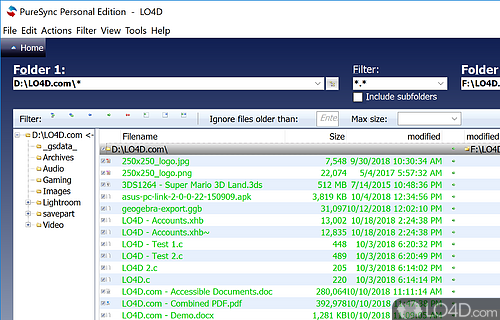
Synchronization tasks can be configured to copy changes between selected folders. One-way synchronization is useful when one location should serve as the source and another as its copy; two-way synchronization helps keep both locations updated. PureSync can also compare files, helping users identify differences before or while managing a synchronization task. For recurring work, tasks can run automatically, reducing the need to remember to copy files by hand.
The program also provides backup features, including scheduled and incremental backups. Incremental backups copy files that have changed since the previous backup, which can reduce the time and storage needed for repeat runs. Conflict detection helps identify discrepancies when files have changed in more than one location, while file versioning provides a way to restore earlier copies. Options for encrypting data during transfer and storage are available for users handling sensitive files.
PureSync Personal can support everyday routines such as keeping work folders available at home, copying photos to another drive, or maintaining an up-to-date backup of documents. Its task-based setup lets users configure different synchronization and backup jobs for different folders or destinations, then run them when needed or automate them. A graphical interface guides the setup and management of these tasks, making the program accessible to users who do not want to manage file copying through scripts or command-line tools.
PureSync Personal is shareware from Jumping Bytes and is available for Windows 10 and Windows 11, as well as a range of Windows Server releases. The available operating-system support also includes Windows 8. Users should choose synchronization directions and backup destinations carefully, since syncing changes between folders is different from keeping an independent backup. Encryption, versioning and other options can be configured according to the needs of each task.