BackUp Maker
... the download page for "BackUp Maker", an exceptional software developed by the renowned ASCOMP Software GmbH. This software is a must-have for all Windows 10 users ...

AllSync manages file copying, synchronization, backup, replication and archiving between folders on local drives or network locations. It saves job settings as reusable profiles and provides previews and side-by-side reports to review file changes before copying. Filters, optional safeguards for moved or overwritten files, ZIP compression and command-line controls support tailored workflows. Its Scheduler can run jobs at set intervals or as a Windows service.
| Author: | MTSD |
| License: | Demo |
| Price: | $25.00 |
| Released: | May 23, 2026 |
| File size: | 18.03 MB |
| Downloads: | 519 |
| Keywords: | network folder sync, archiving, directory, AllSync, two-way, software, data synchronization, folder backup tool, imaging, laptop, solution, compare, tool, content, sync, storage, scheduled backup utility, MTSD, comparing, replicate, network, syning, x64 architecture, backup, automatic, comparison, synchronization, notebook, file synchronization software, backup software, synchronize, synchronizing, replication, one-way, mirroring, disk, automated file copying, server, file replication software |
| Author URL: | https://allsync.de |
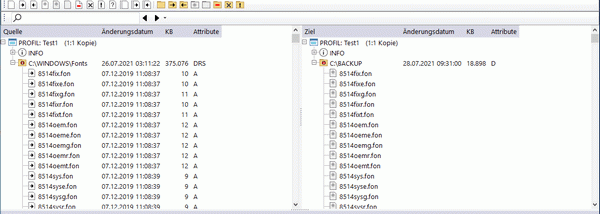

AllSync is a Windows utility for copying and managing files between folders, drives and network locations. It is suited to people who need repeatable synchronization, backup, replication, imaging, updating or archiving tasks, whether they work with a local disk, removable storage or a shared network path. Any storage location accessible through a drive letter or network path can be used as a source or destination.
Copy modes provide different ways to transfer and compare folder contents, while configurable options tailor each operation to its purpose. Settings for a particular source and destination are saved in a profile, allowing separate jobs to be organized in a profile list and reused without rebuilding their configuration. Before copying, users can generate a preview of the planned changes. AllSync displays file and folder actions side by side in report windows, where they can be reviewed and edited before the operation runs. This helps identify what will be copied, overwritten, moved or deleted and adjust the job when needed.
Filters can exclude files and folders according to their paths, names or properties. For added protection, items that a copy operation would delete, overwrite or move can first be sent to the Windows Recycle Bin or a separate backup folder. ZIP compression is available for creating more space-efficient backups. AllSync also accepts command-line options, so configured copy tasks can be started from scripts or other automated workflows, and Windows environment variables can be used in supported settings.
AllSync Scheduler automates copy operations on daily, weekly, monthly or other scheduled intervals. It can also run as a Windows service, allowing scheduled jobs to proceed when no user is signed in. These options make the software useful for recurring workstation backups, maintaining a second copy of important folders, updating files across computers, and managing routine transfers to network storage. Profiles keep different projects and destinations separate, while previews and reports provide a way to check a job before it changes files.
AllSync runs on Windows 7 or later, including Windows 10 and Windows 11, and supports English, German, French, Spanish, Italian and Dutch. Its Demo license allows evaluation before purchase. The range of copy settings and scheduling controls suits users who need more control than a basic manual file copy, while profiles help keep repeated operations consistent.