Windows 10
Windows 10 is Microsoft’s desktop operating system for personal computers, ... workloads depend on appropriate management, software and hardware. Windows 10 updates deliver fixes and refinements without necessarily changing ...

Redshift GUI is a Windows utility that adjusts a monitor's color temperature according to the time of day. It can use a cooler tone during daylight and a warmer tone at night, helping the screen better match surrounding light. Location can be detected through an IP address or entered by ZIP code, and the behavior is configurable. It is intended for everyday display use, not precise color calibration.
| Author: | Mao Yu |
| License: | Freeware |
| Price: | FREE |
| Released: | May 21, 2014 |
| File size: | 532 kB |
| Downloads: | 1943 |
| Keywords: | Redshift GUI, color temperature adjustment, Windows 10, change, automatic display color, x64 software, change monitor color, adjust, SourceForge, screen color temperature, monitor color changer, warmer screen at night, Mao Yu, redshift gui, changer, adjust monitor color, monitor color temperature |
| Author URL: | http://www.mao-yu.com/ |

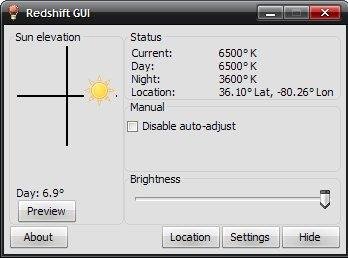


Redshift GUI is a Windows utility for changing a monitor's color temperature to better suit the lighting around it. It is intended for people who use the same display throughout the day and want its appearance to shift with changing daylight and indoor light. Rather than requiring constant manual adjustments, it can change the screen's color temperature according to the time of day.
During daylight hours, the tool can use a cooler screen tone to better match natural light. At night, it can switch to a warmer tone suited to typical indoor lighting. These changes affect the overall color balance of the display, so whites and other light areas can look less blue in the evening. The schedule makes the adjustment part of the normal desktop routine, rather than a setting that must be changed each time the room's lighting changes.
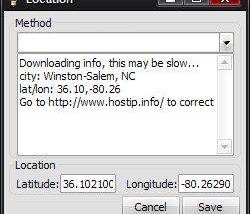
The program can detect a location using an IP address or a ZIP code, which helps it determine the local day and night cycle. Location matters because daylight timing differs across regions. Users can also configure the tool, allowing its behavior to be adjusted rather than relying only on automatic location detection. The interface provides access to these color-temperature controls without requiring users to work directly with command-line settings.
Redshift GUI can suit people who read, write, browse or work at a computer from morning into the evening, especially when the display remains on after natural light has faded. It changes the display's color appearance; it does not alter the room lighting or the content being viewed. Because warmer tones change how colors appear, users may prefer to disable or adjust the effect when accurate color judgment is important, such as when editing photographs or preparing visual designs.
The software is freeware and is intended for Windows. Its focus is limited to monitor color temperature and its time-based adjustment, making it a small utility rather than a full display-calibration suite. Users who need precise color matching for professional work should use dedicated calibration tools and hardware, while Redshift GUI provides a straightforward way to adapt screen tone to everyday changes in ambient lighting.