Twistpad for Windows 10 - Full description
Twistpad is a Windows text editor for everyday writing as well as web and software development. It can serve as a more capable alternative to a basic notepad, with editing tools for working on code, markup, and other text files. Its interface and commands can be configured to suit different editing habits, making it useful for both quick changes and longer projects.
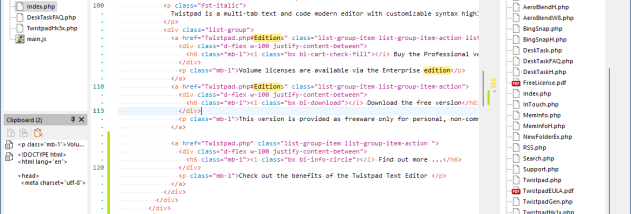
Syntax highlighting helps distinguish elements such as tags, keywords, and values in supported formats, including HTML, ASP, XML, C++, and Pascal. Users can also create highlighting schemes for languages or file types that need custom rules. Auto-complete can assist while entering text, while auto-replace applies configured substitutions. Spell checking and active spell checking help find spelling errors during editing.
For editing and cleanup, Twistpad includes standard clipboard operations alongside formatting commands for tasks such as joining lines, removing empty lines, and sorting text. Find and replace works across files, and the editor can compare text files, including documents that are still open for editing. Auto-recover helps preserve work after interruptions. Projects can be managed within the application, and external tools or compilers can be integrated into the workflow.
The editor can export content to Rich Text Format and HTML, and supports Unicode for text in a broad range of writing systems. Toolbars, editor context menus, keyboard shortcuts, and colors are configurable, so common commands and visual settings can be adapted to a project or personal preference. These features make Twistpad suitable for editing source files, maintaining web pages, comparing revisions, and handling general text without switching between separate utilities.
Twistpad is freemium software from Carthago Software and is available in English. It runs on Windows 10 and Windows 11, including 32-bit and 64-bit editions. Its native Windows implementation is designed to avoid installing or altering system DLL files, and the editor emphasizes quick startup and text parsing. A free option makes it possible to use it for basic editing, while the broader feature set is aimed at users who need more than a plain text editor.