Dia for Windows
... the result useful for documenting a process, outlining software structure, or mapping a network. Other diagram types ... XFIG, WMF, and PNG. These cover vector artwork, image files, and formats used by other drawing tools. ...

SmartImage is an open-source image editor for photographers, designers and anyone who needs to adjust digital pictures. It offers automated enhancement suggestions, color correction, filters and manual controls for exposure, contrast, saturation and sharpness. Non-destructive editing helps preserve originals while users experiment. Support for multiple image formats and an interface designed for different experience levels suit both quick corrections and more detailed edits.
| Author: | Read Stanton |
| License: | Open Source |
| Price: | FREE |
| Released: | Feb 23, 2026 |
| File size: | 31.10 MB |
| Downloads: | 168 |
| Keywords: | SmartImage free download, open-source software, image filter software, open source, Picture, smartimage image editor, smartimage download, Search, Read Stanton, Find, AI enhancement, non destructive image editor, image processing, Image, GitHub, software, SmartImage, Find Image, Search by Image, user-friendly interface, image enhancement software, high-resolution support, download SmartImage, photo color correction, cross-platform compatibility, Reverse Image Search |
| Author URL: | https://github.com/Decimation/SmartImage |


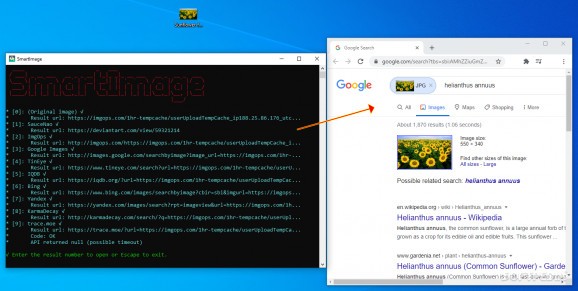

SmartImage is an open-source image editing application for photographers, graphic designers and other users who need to adjust digital pictures. It combines automatic enhancement options with manual controls, giving users a choice between applying suggested changes and tuning an image themselves. Its tools cover common editing tasks such as color correction, exposure, contrast, saturation, sharpness and filtering.
For a quicker starting point, SmartImage can analyze an image and suggest adjustments. This automation is useful when processing multiple pictures or when users want a first pass before making their own refinements. Color correction and filters offer additional ways to change an image's appearance, while manual controls let users adjust individual properties rather than relying solely on automated results. The software is presented as supporting non-destructive editing, so adjustments can be explored without changing the original image.
The interface is arranged to make editing tools accessible to both newcomers and experienced users. SmartImage supports a range of image formats and can fit into workflows that involve other design or editing applications. Tutorials and support documentation are available to help users learn the controls. The combination of automated suggestions and individual adjustments makes it suitable for both occasional edits and more involved image work.
Typical uses include correcting color and exposure, applying filters, sharpening pictures and preparing a batch of images with less repetitive manual work. Users who prefer hands-on editing can refine settings themselves, while those handling many images can use the suggested adjustments to speed up a first review. SmartImage is offered as open-source software at no cost. It is intended for 64-bit Windows 10 and Windows 11 systems.