Stexbar
StExBar is an add-on for Windows Explorer that puts frequently used file-management commands within reach ... menu, so they can be used alongside normal Explorer navigation. One of its main functions opens a console ...

StExBar is an open-source Windows Explorer add-on for quick access to practical file and command-line tasks. It can open a system console in the folder currently displayed, run an entered command, and copy selected file or folder names or full paths to the clipboard. Commands are available from the toolbar, context menu, and keyboard shortcuts.
| Author: | Stefan Küng |
| License: | Open Source |
| Price: | FREE |
| Released: | Jan 15, 2021 |
| File size: | 461 kB |
| Downloads: | 343 |
| Keywords: | explorer keyboard shortcuts, explorer plugin, stexbar, File Explorer enhancement, addon, copy file paths, open console in folder, explorer toolbar, Stefan Küng, windows explorer addon, explorer, plugin, Stexbar x64, Windows 10 utility, Command line features, explorer addon, Quick access toolbar, utility bar |
| Author URL: | https://tools.stefankueng.com/ |
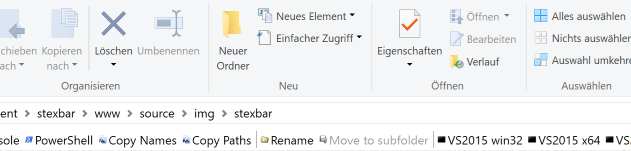

StExBar is an open-source add-on for Windows Explorer that puts useful file-management commands within reach while browsing folders. It is aimed at people who often work with files and directories and want quick access to a command console or to copy item names and paths. Commands can be launched from its toolbar, a context menu, or keyboard shortcuts, so common tasks do not require opening a separate utility or navigating through extra dialogs.
Opening a console in the folder currently displayed in Explorer is one of StExBar's central functions. A toolbar command or the Ctrl-M shortcut starts the system console with that folder as its working directory. This is useful when a command-line task depends on the location of the files being viewed: the user can move to the folder in Explorer and open the console there, rather than starting a console elsewhere and changing directories manually. The context menu provides another way to reach commands while working with files.
StExBar also includes a command-entry field for running an entered command in the system console. This lightweight option is suited to a quick command when a separate console window is not needed in advance. For sharing file references with another application, it has separate commands to copy the names of selected files or folders and to copy their full paths. The distinction matters because Explorer's ordinary copy action copies the selected items themselves, not their path text. Ctrl-Shift-C copies the paths of selected items to the clipboard for pasting into a document, message, or command.
These tools are useful for routine file operations, scripting, troubleshooting, and communicating the location of files to other people or applications. The toolbar keeps commands visible during browsing, while shortcuts make frequently used actions faster; the context menu offers access from the items being handled. StExBar is a focused Explorer utility rather than a general file manager, and its features center on launching commands and transferring file-location text.
StExBar is free and open source. It is an Explorer add-on for 64-bit Windows; the supplied compatibility information includes Windows 10 x64 and earlier 64-bit Windows releases. Its integration depends on Windows Explorer, making it most relevant to users who use Explorer as their everyday file browser.