FileMove SE
... designed to simplify and automate the process of file management, making it an essential asset for both personal ... SE stands out in the crowded field of file management software with its intuitive user interface and robust ...

Tabbles Home organizes files by linking them to multiple categories, called tabbles, such as projects, customers, or topics. Files can appear in more than one work context without being copied or moved, so edits remain attached to the same original. This approach helps reduce duplicate files, inconsistent versions, folder clutter, and storage use. It is a trialware file management tool for Windows users.
| Author: | Yellow blue soft |
| License: | Trialware |
| Price: | $19.99 |
| Released: | May 31, 2024 |
| File size: | 66.60 MB |
| Downloads: | 225 |
| Keywords: | data management, Sorter, categorize documents, Tabbles Home, Yellow blue soft, file organization, avoid duplicate files, Categorise files, Windows 10 compatible, File sorter, file management tool, tag-based software, Categorise, tabbles home, Sort, File management, organize files by project, file categorization software |
| Author URL: | https://tabbles.net/ |
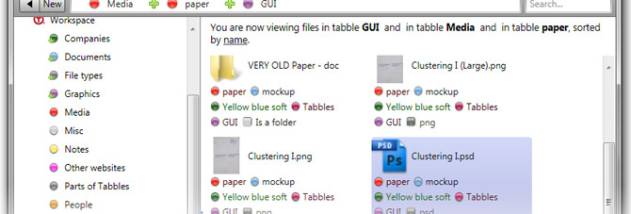

Tabbles Home is a file organization tool for people who need to group the same documents under multiple projects, customers, or other categories. Instead of relying only on a folder hierarchy, it lets users associate files with several tabbles, its named categories. A file can therefore belong to different work contexts without being copied or moved into separate folders, while the original file remains in place.
Users can organize files by assigning them to categories that reflect how they work, such as a customer, project, topic, or department. Those associations make it possible to find a file through more than one category, which is useful when folder paths alone do not capture all its roles. For example, a document shared by two projects can be linked to both, rather than duplicated and maintained separately. When the original is changed, the different project views still refer to that same file.
This approach can reduce redundant copies and the work involved in deciding which copy is current. It also helps limit inconsistencies caused by editing one version while leaving another unchanged. Organizing files through categories can make it easier to locate related items without repeatedly rearranging folders, and avoiding unnecessary copies can help keep a hard drive less cluttered and conserve storage space. Tabbles is intended to complement the way files are already stored, not require a separate copy of each item for every use.
Tabbles Home can suit home users who manage documents across several activities, as well as people handling customer materials, shared project files, or collections that do not fit neatly into a single folder structure. Its central idea is to describe files by their relationships and uses, rather than making one folder location carry the full burden of organization. This is particularly helpful when the same file has a continuing role in multiple contexts and should remain consistent everywhere it is used.
The software is trialware and is intended for Windows, including Windows 10 and Windows 11. Its category-based organization is most useful when users are willing to assign and maintain meaningful labels for their files. Tabbles Home focuses on organizing existing files through multiple associations, helping reduce copy-based workflows and the manual cleanup that follows them.