Unlocker portable
Unlocker Portable is a small Windows utility for handling ... Windows reports that an item is in use, Unlocker can attempt to unlock it so the requested ...

Unlocker is a lightweight Windows utility for renaming, moving or deleting files that another process is using. It can identify the process holding a lock and let the user release it before retrying the operation. A system-tray Assistant provides quick access to the basic main window. The freeware runs without setup and can be carried on removable storage.
| Author: | Cedrick Collomb |
| License: | Freeware |
| Price: | FREE |
| Released: | May 30, 2017 |
| File size: | 1.00 MB |
| Downloads: | 358 |
| Keywords: | delete locked file, file unlock utility, unlock, Cedrick Collomb, x64 architecture, terminate, Unlocker software, unlocker, rename locked files, remove file access errors, system process management, unlock file, Windows 10 compatibility, delete files in use, remove error message, file deletion utility, unlock locked files, move files in use |
| Author URL: | http://www.emptyloop.com/ |
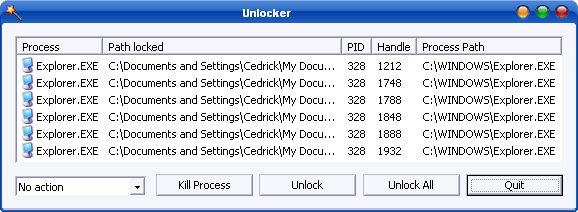


Unlocker is a small Windows utility for dealing with files and folders that cannot be renamed, moved or deleted because another process is using them. It is intended for people who encounter Windows file-operation errors and need to identify or release the process holding a file in use. Rather than replacing File Explorer, it provides a focused tool for resolving these specific access conflicts.
When a file operation fails, Unlocker can show which process is locking the selected item. The user can then choose an action such as unlocking it, renaming it, moving it or deleting it. This helps distinguish a temporary file-in-use conflict from a routine permission or path issue. Releasing a lock may allow the selected operation to proceed without closing unrelated applications, although a file that is still needed by a running program may become unavailable to that program.
The utility also includes an Assistant that runs from the Windows system tray. Its icon can be double-clicked to open the main window, providing a way to access Unlocker without keeping the full interface open. The main window is deliberately simple and centered on selecting an item and choosing an operation, rather than offering broader file-management features.
Typical uses include removing leftover files after an application has closed, renaming items blocked by an active process, or moving files that Windows reports as in use. Unlocker is not a general cleanup or security tool; its purpose is to address locks that interfere with ordinary file operations. Users should check the process holding an item before releasing it, especially when the file belongs to an application or Windows component that is still running.
Unlocker is freeware and is presented as a lightweight, portable utility that does not require setup, so it can be carried on removable storage. It supports Windows editions through Windows 10, including 64-bit Windows versions. The available platform information does not establish support for Windows 11, so compatibility on that system should not be assumed.