Windows 8.1 Preview review by alulutho (Oct 11, 2016)


so far so good

Windows 8.1 is a Microsoft operating system preview that updates the Windows 8 interface with a Start button, more Start screen personalization and unified search across the PC, apps and web. It also includes Internet Explorer 11 Preview, SkyDrive file management and touch-oriented browsing. Create recovery media before installing this pre-release edition.
| Author: | Microsoft |
| License: | Freeware |
| Price: | FREE |
| Released: | Jun 27, 2013 |
| File size: | 2600.00 MB |
| Downloads: | 2748 |
| Keywords: | windows internet explorer, Operating System, Windows8.1, Windows Operating System, Windows 8.1, User Interface, Windows OS, System Performance, x64 software, Windows 8.1 Preview, windows start screen, windows skydrive app, windows unified search, windows 8.1 preview, Microsoft, Windows, windows operating system |
| Author URL: | https://www.microsoft.com |
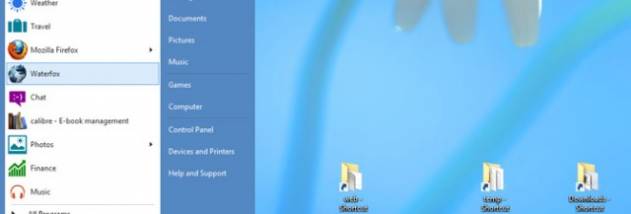

Windows 8.1 is a Microsoft operating system for desktop and tablet PCs, and this preview edition lets Windows users try its updated interface and built-in features. It is aimed at people testing the changes to Windows 8 before installing the preview, as well as users exploring its touch-friendly Start screen, search and web browsing tools. The release is a pre-release build rather than a final, supported edition, so it is best suited to evaluation on a device that can be recovered or reinstalled if needed.
The Start screen offers more tile sizes, colors and backgrounds, including animated options, so users can organize app shortcuts and live information to suit their workflow. A lock-screen slideshow can display selected personal photos. These settings let people adapt the screen they see when signing in and make frequently used apps easier to reach. The Start button returns to the desktop interface, providing another route between the desktop and Start screen.
Unified search looks across the PC, installed apps and the web, presenting results in a visual layout. Depending on the result, users can take an action directly, such as launching an app, playing a song or opening a video. Internet Explorer 11 Preview adds touch-oriented browsing, full-screen display and the ability to view sites side by side. Live tiles can also show current information from favorite websites on the Start screen.
SkyDrive is the default save location for documents, making files available across devices and for offline use. Its included app brings local and SkyDrive files together for browsing and management. These features support everyday work such as organizing documents, finding content across different sources, using web apps and personalizing a shared or personal PC. The operating system also includes apps and services as part of the Windows experience.
The preview is offered at no charge as an update for Windows 8, with installation conditions depending on the existing Windows installation and language. For English-language installations, the system's base language must be English (US) to install through the Windows Store. Users should create a USB recovery drive before installation if they lack recovery media, so they have a way to return to Windows 8. PCs not running Windows 7 or later require a fresh installation. Compatibility and recovery options should be checked before installing a pre-release operating system.
so far so good