EF Duplicate MP3 Finder
Welcome to the home of EF Duplicate MP3 Finder, a powerful software tool developed by EFSoftware, designed ... cluttered with duplicate MP3 files. EF Duplicate MP3 Finder is a robust solution that scans your system, ...

X-Ripper scans large files and game libraries for recognizable media formats, then saves detected files to a chosen folder. It searches audio, image and video types, including WAV, OGG, PNG, DDS, AVI and BIK. Users select the formats to look for, choose a source and destination, and start the scan.
| Author: | Zeus Software |
| License: | Freeware |
| Price: | FREE |
| Released: | Oct 21, 2009 |
| File size: | 61 kB |
| Downloads: | 286 |
| Keywords: | extract, file extraction tool, game archive extractor, embedded file finder, finder, file finder, big file extractor, media file extractor, multimedia ripping, Windows 10 compatibility, game asset extraction, audio file recovery, archive media scanner, Zeus Software, x64 software, user defined format, extractor, X-Ripper |
| Author URL: | https://www.zeus-software.com/ |
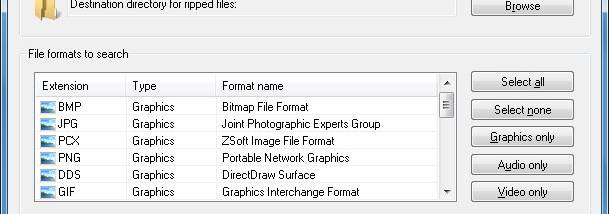



X-Ripper is a file extraction utility for finding media files embedded in large libraries and archives, particularly those used by games. It scans a selected file for recognizable audio, image and video formats, then saves detected files to a destination folder. This can help users recover assets from game data when the files are bundled together rather than stored individually.
The program supports audio formats including WAV, OGG, WMA, MID, VOC, AU and AIF. Users choose which formats to search before starting a scan, so they can focus on specific types of media instead of extracting every supported category. When X-Ripper recognizes a file, it automatically writes it to the selected destination directory.
Image formats include BMP, JPG, PCX, PNG, DDS, GIF, TGA and TIF. For video, it can search for AVI, WMV, SMK and BIK files. These format selections make the utility useful for looking through mixed archives for particular assets, such as textures, artwork, sound effects or video clips. Its workflow is based on choosing a source file, selecting an output folder and starting the scan.
X-Ripper is aimed at users who need to inspect large files for media content without manually browsing their internal structure. It can be used to retrieve game resources for reference, organize extracted media, or check whether a library contains recognizable files in supported formats. Results are saved as separate files in the chosen folder, where they can be reviewed with compatible applications.
The program is freeware and is designed for Windows. Its listed operating system support includes Windows XP through Windows 10; compatibility with newer Windows releases is not established here. The small download and straightforward three-step process make it a focused option for format-based extraction rather than a general archive manager.