xplorer² x64
xplorer² x64 is a 64-bit file manager for users ... images and audio or video content. For repetitive work, xplorer² can run text commands or DOS scripts on ...

xplorer² is a Windows file manager with tabbed browsing and a dual-pane layout for working with multiple folders. It includes file search with detailed filters, duplicate detection, folder comparison and synchronization, content previews, and tools for batch renaming and file operations. NTFS features and virtual folders are supported.
| Author: | Nikos Bozinis |
| License: | Trialware |
| Price: | $29.95 |
| Released: | Nov 8, 2021 |
| File size: | 2.60 MB |
| Downloads: | 327 |
| Keywords: | advanced search capabilities, explorer, file explorer, Windows 10, dual pane file manager, folder manager, File manager, file management, duplicate file finder, bulk file renamer, xplorer², Nikos Bozinis, folder comparison software, tabbed file explorer, x64 software, manager, manage, file search tool |
| Author URL: | http://zabkat.com/ |
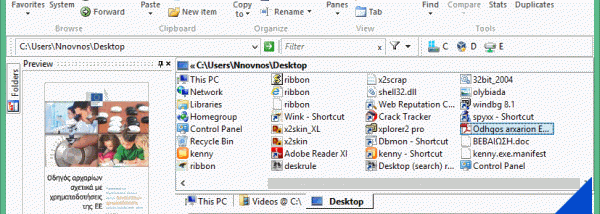

xplorer² is a Windows file and information manager for people who regularly organize, inspect, compare, or move files across multiple folders. Its dual-pane layout and tabbed browsing keep several locations available at once, while a familiar Windows-style interface provides access to common shell features. The program aims to keep routine file management straightforward while offering more precise controls for complex tasks.
The two-pane view makes it possible to browse separate folders side by side and move or copy items between them. Tabs provide another way to keep frequently used locations open without filling the screen with separate windows. Folder comparison and synchronization tools help identify differences between two locations and bring their contents into line. A visual filtering and selection system narrows the items shown or selected, which is useful when a folder contains many files.
For locating and reviewing content, xplorer² includes Omni-Finder, a file search module with filters that can search file details such as comments. It can also find duplicate files for cleanup. The program displays extended information, including MP3 tags and checksums, and offers previews for text, graphics, and audio or video content. Virtual folders such as FTP locations, web folders, and ZIP folders can be handled alongside regular filesystem locations.
Additional tools cover mass renaming, splitting and merging files, changing file dates, and securely shredding files. Users can run text commands or DOS scripts on selected items, and the program supports NTFS features such as hard links and file comments. Transfers are designed for filesystem file and folder operations, while Unicode and text-encoding awareness helps when working with files containing different character sets. File information can be exported as text for printing or reference.
Keyboard shortcuts, location histories, and autocomplete support faster navigation and repeated tasks. These features suit home and office users who need more control than a basic file browser provides, especially when handling large collections, checking duplicates, synchronizing folders, or performing batch operations. xplorer² is trialware. The supplied platform information lists Windows versions through Windows 10; Windows 11 support is not established here.