Actual Window Guard for Windows 10 - Full description
Actual Window Guard is a desktop utility for people who want more control over how application windows behave. It applies rules to windows as they open or are used, helping keep a desktop organized without repeatedly adjusting size, position, or state by hand. Rules can target particular window types or apply broadly, so the utility can support both a consistent general layout and exceptions for specific applications.
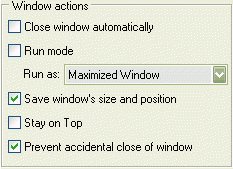
Window placement rules can resize and position windows automatically, align them within the desktop, and keep chosen windows on top. Startup actions can open a window minimized or maximized, while safeguards can prevent accidental closing. These controls are useful for keeping frequently used tools visible, starting applications in a preferred state, and reducing interruptions from windows that appear in inconvenient places. The program can also close unwanted pop-up windows according to configured rules.
Additional options adjust window details beyond the standard controls. Users can change a window's title or icon, remove it from the taskbar, and set other individual behaviors. Rules can be managed for different kinds of windows or applied across window types, letting users define a repeatable setup rather than handling each window manually. Support for multi-monitor systems makes it possible to organize windows across more than one display, and the program can manage windows from 64-bit applications as well as console or command-prompt windows.
Actual Window Guard is suited to workstations where applications need to open in predictable locations, pop-ups should be dismissed, or selected windows must remain visible. It can also help users who frequently switch between tasks by preserving an orderly arrangement across sessions. Its per-window controls allow a customized setup for individual applications, while broader rules cover routine behavior across the desktop.
The software is shareware and is available for Windows 10 and Windows 11, as well as a range of earlier Windows systems. It supports multiple interface languages, including English, German, French, Spanish, Italian, Dutch, Portuguese, Russian, and Polish. The stated minimum requirements are a Pentium III-class 600 MHz or faster processor, 512 MB of RAM, and 10 MB of free disk space. Actual Window Guard is designed to manage desktop windows rather than replace the applications themselves.