Metadata++
Welcome to the download page for Metadata++, an exceptional Windows 10 software developed by the talented Jean Piquemal. Metadata++ is a powerful tool that allows you to ...

BatchPurifier removes hidden metadata from documents, images and other files to help reduce the personal or organizational information they reveal. It handles batches of files and supports formats including Microsoft Office documents, PDFs and JPEG images. Users select files, choose removal options and process them locally, without an internet connection. Customizable settings accommodate different cleanup needs. It is intended for preparing files to share, publish or archive.
| Author: | Digital Confidence Ltd. |
| License: | Demo |
| Price: | $19.00 |
| Released: | Nov 4, 2025 |
| File size: | 3.30 MB |
| Downloads: | 406 |
| Keywords: | x64 application, Digital Confidence Ltd., metadata removal, Windows 10 software, BatchPurifier, metadata cleaner, purifier, remove metadata, metadata, offline metadata removal, metadata remover, clean file metadata, strip image metadata, remove document metadata, data sanitization, cleaner, metadata purifier, batch metadata cleaner |
| Author URL: | https://www.digitalconfidence.com/ |

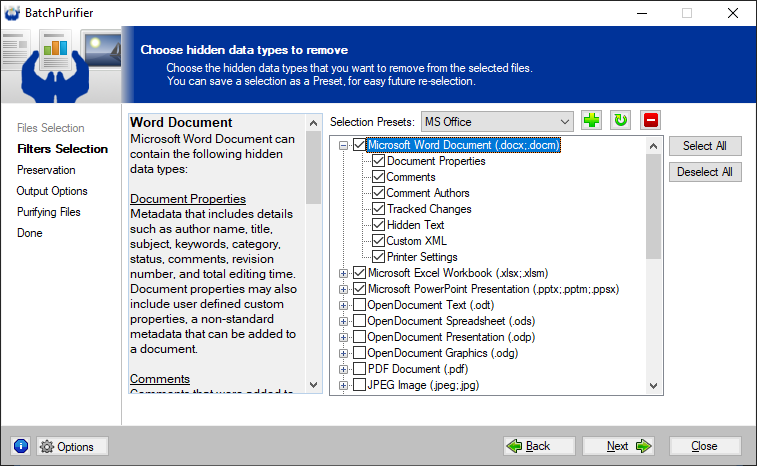




BatchPurifier is a Windows utility for removing hidden metadata from files before they are shared, stored or distributed. It is intended for individuals and organizations that want to reduce the personal or business information embedded in their documents and media. Metadata can include details such as an author's name, document history or GPS coordinates in an image; removing it can help limit what a file reveals beyond its visible content.
The program processes files in batches, so users can sanitize multiple items in one operation rather than opening and editing them individually. This is useful when preparing a folder of documents or images for publication, sending a set of records to clients, or cleaning files collected for an archive. Batch processing can also make recurring tasks more manageable when many files need the same privacy treatment.
BatchPurifier supports a range of file formats, including Microsoft Office documents, PDFs and JPEG images. Users select files, choose metadata-removal options and run the purification process. Customizable settings allow the cleaning process to be adjusted for different requirements, such as an organization's privacy practices. The purpose is to remove embedded metadata while leaving the files ready for their ordinary use; it is not described as an editor for changing the visible contents of documents or images.
The utility operates offline and processes files locally on the computer, rather than sending them over an internet connection for cleaning. That workflow can be valuable when handling confidential material or when files should remain within a local environment. BatchPurifier can therefore fit into a pre-sharing review process, helping users check that common identifying traces are removed before files leave their control.
BatchPurifier is distributed as demo software and requires .NET Framework 4.0. It supports Windows 10 and Windows 11, along with several Windows Server releases and earlier Windows versions. The supported file formats and configurable removal options make it relevant to both occasional personal cleanup and repeated organizational work; users should select the appropriate files and settings for their needs before processing a batch.