PC Booster
... with the "PC Booster" software, a product of PC Booster. This software is a must-have for all Windows ... who crave an optimized and efficient computing experience. PC Booster is a one-stop solution that promises to speed ...

Chris-PC RAM Booster monitors physical memory use and can try to free RAM when available memory drops below a user-set threshold. It runs as a background service and offers controls for CPU-use conditions, full-screen applications and laptop battery operation. A system tray icon shows live memory use, while statistics and a built-in benchmark support monitoring and stability checks. It is aimed at PC users and server administrators who want configurable control over memory and page-file use.
| Author: | Chris P.C. srl |
| License: | Shareware |
| Price: | $14.99 |
| Released: | Oct 1, 2026 |
| File size: | 5.25 MB |
| Downloads: | 910 |
| Keywords: | system performance enhancement, page file, improve your computer performance, memory benchmark tool, free up ram, memory manager, pc booster, ram usage monitor, virtual page file, ram booster, ram memory manager, memory booster, virtual memory, windows page file manager, tweak pc, Chris-PC RAM Booster, PC speed boost, RAM optimization, memory management, memory booster utility, optimize memory, fast memory, free memory, software efficiency, faster computer, boost computer speed, boost speed |
| Author URL: | http://www.chris-pc.com |
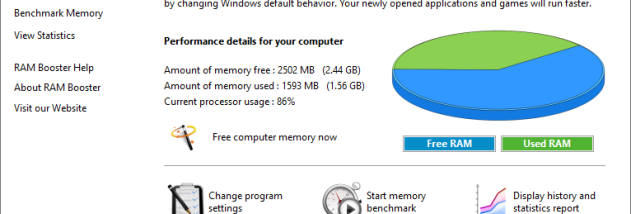
Chris-PC RAM Booster is a Windows memory management utility for users who want to control how physical RAM and the Windows page file are used. It monitors memory use in the background and can start a freeing process when available RAM falls below a threshold chosen in its settings. The utility is intended for everyday PCs as well as server machines, including systems running without a logged-in user.
When the configured threshold is reached, RAM Booster attempts to make memory available for newly opened programs by moving older program data from physical RAM to virtual memory on disk. Users can set the low-memory threshold and adjust other options that affect when memory is freed, including CPU-use conditions. These controls let them tailor the utility's behavior to a system's workload rather than relying only on Windows' default memory-management behavior.
The settings also include an option for full-screen applications, allowing users to account for games or other programs that occupy the whole display. On laptops, the memory-freeing process can be disabled while the computer runs on battery and automatically resumed when it is plugged in. RAM Booster runs quietly as a background service, so its monitoring and configured actions do not require a user to keep the main interface open.
A system tray icon provides a live indication of memory use, while statistics offer an overview of performance with the utility active. A built-in memory benchmark evaluates system and RAM stability, giving users another way to check their computer. Together, these tools support routine monitoring, tuning memory behavior for games or applications, and keeping more memory available to server programs on machines that may be unattended.
Chris-PC RAM Booster is shareware from Chris P.C. srl, with an interface available in English, French and Portuguese. Its listed Windows compatibility includes Windows 10 as well as several older Windows releases and Windows Server 2012. It changes memory-management behavior through configurable thresholds and options; the amount of memory available and the effects of moving data to the page file depend on the computer and its workload.