Directory Monitor Portable
Directory Monitor Portable watches selected folders and network shares for ... and other users who need to know when monitored data is added, removed or modified, including in ...

Directory Monitor watches selected local folders and network shares, including hidden shares, for new files, modifications and deletions. It reports events with balloon notifications and can launch an application when activity occurs. Status indicators show whether a directory is available and being monitored, while import and export options help reuse configurations. The freeware supports Windows 10 and 11 and requires .NET Framework 4.0, installed automatically.
| Author: | DevEnterprise Software |
| License: | Freeware |
| Price: | FREE |
| Released: | Apr 12, 2024 |
| File size: | 6.60 MB |
| Downloads: | 352 |
| Keywords: | notifier, user activity logging, real-time tracking, folder change notifications, DevEnterprise Software, directory monitor, monitor network shares, folder monitor, monitor folder, track file deletions, monitor, detect new files, network directories, checker, folder monitoring software, file system monitoring, directory change alerts, Directory Monitor |
| Author URL: | https://www.deventerprise.com/ |
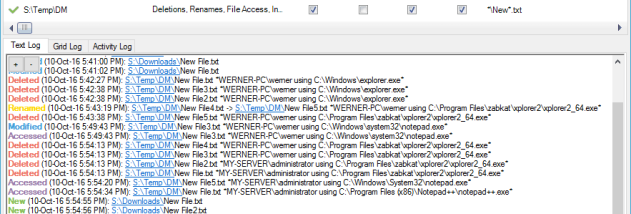

Directory Monitor is a Windows utility for watching selected folders and network shares for file activity. It is intended for people who need to notice changes in working directories, shared storage or other locations without repeatedly checking them by hand. The program can monitor local folders as well as network shares, including hidden shares, and reports new files, modifications and deletions.
Monitoring is configured around the directories that matter. Once a folder is being watched, Directory Monitor checks for supported file events and displays a balloon notification when one occurs. This makes it easier to spot incoming files, edits or removals while working in other applications. Its status indicators also help show whether a directory is available and currently being monitored, which is useful when a watched location is on a network and may not always be reachable.
For workflows that need more than a visual alert, the program can launch an application when a monitored event occurs. That provides a way to connect file activity with another tool or process, such as opening a relevant application after a change. Import and export options help transfer or preserve monitoring configurations, while automatic updating supports keeping the application current. Together, these features let users set up monitoring once and reuse the configuration rather than rebuilding it for each session.
Typical uses include watching a shared folder for newly delivered documents, keeping track of changes to project files, or receiving notice when files are deleted from a selected directory. It can also help administrators and other users observe activity in network locations, including hidden shares, without manually browsing them at regular intervals. Notifications and optional application launching provide different levels of response depending on whether a quick heads-up or an automated follow-up is needed.
Directory Monitor is freeware from DevEnterprise Software and supports Windows 10 and Windows 11, as well as earlier Windows releases. It requires .NET Framework 4.0, which is installed automatically. The interface is available in English, Chinese, Russian, Japanese, Polish and Turkish. Its focus is directory activity rather than general system monitoring, so its usefulness depends on selecting the folders and shares whose file changes need attention.