Disk Savvy Pro x64
Disk Savvy Pro is a disk space analysis application for Windows users who need ... across computers and shared storage. It scans local disks, network shares and NAS devices, then organizes findings ...

Disk Savvy Pro analyzes storage usage across local disks, directories, network shares and NAS devices. It can group files by type, apply rule-based analysis and export detailed reports to HTML, Excel-compatible CSV or text. Built-in file operations, security attribute copying, data wiping and performance controls support storage audits and cleanup workflows.
| Author: | Flexense Computing Systems Ltd. |
| License: | Trialware |
| Price: | $50.00 |
| Released: | Jun 18, 2024 |
| File size: | 6.50 MB |
| Downloads: | 366 |
| Keywords: | viewer, HDD analyzer, disk space analyzer, network shares analysis, Flexense Computing Systems Ltd, analyze network share storage, space usage analyzer, storage visualization, Disk Savvy Pro, storage analysis tool, disk usage viewer, analyzer, disk space usage, file categorization, analyze, disk usage reports, find large files, disk usage analyzer |
| Author URL: | https://www.syncbreeze.com/ |
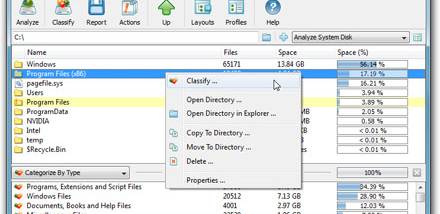



Disk Savvy Pro is a disk space analysis utility for users who need to understand how storage is occupied across local drives, folders, network shares and NAS devices. It scans one or more selected locations and summarizes the files it finds, helping administrators and home users identify large collections, investigate storage growth and decide where cleanup or reorganizing may be useful. Its focus is file and disk usage rather than system memory testing.
Analysis can be narrowed to specific file types, and the built-in file filtering plugin groups data by categories such as images, sounds and movies. This makes it easier to see which kinds of content account for space in a selected location instead of reviewing every file individually. Pro also adds rule-based analysis, allowing results to be organized according to defined conditions. Long, Unicode and UNC network path names are supported, which helps when scanning folders with international filenames or resources addressed through network paths.
Results can be saved as detailed reports in HTML, Excel-compatible CSV or plain text, for sharing, further review or printing. The program also includes file management operations, including copying, moving and deleting files, with multi-stream operations available. It can copy access control lists and other security attributes alongside files, and built-in data wiping capabilities provide an option for removing data more thoroughly than ordinary deletion. Performance tuning options and dynamic speed control help adapt scanning or file operations to different workloads.
These tools suit routine storage audits, locating space-consuming file types, reviewing shared storage and preparing records of disk usage. An administrator can scan network locations and export findings, while an individual user can compare folders and act on files from within the same utility. Reports also provide a convenient record to email or print after an analysis. Specific file-type filtering can keep an investigation focused when a full inventory would be unnecessarily broad.
Disk Savvy Pro is trialware from Flexense Computing Systems Ltd. It is available for Windows 10 and Windows 11, as well as earlier Windows releases. The program is designed to analyze disks and directories, not to test total system memory. Its Pro features include rule-based analysis, report export and performance controls; users should review the trial terms before relying on it for ongoing use.