Portable DropIt
Portable DropIt is a desktop file-organizing utility for people who ... documents matching a particular name pattern to another. DropIt can move or copy items, as well as ...

DropIt is a desktop file-sorting utility that routes files and folders when they are dropped onto its floating desktop target. Rules can match items by name or file type and move, copy, compress or open them in specified destinations or programs. Profiles keep separate rule sets for different workflows, while duplicate handling can overwrite, skip or rename conflicting files.
| Author: | Lupo PenSuite Team |
| License: | Open Source |
| Price: | FREE |
| Released: | Nov 16, 2017 |
| File size: | 4.00 MB |
| Downloads: | 343 |
| Keywords: | Windows 10 compatible, drop text, drop, DropIt software, file routing rules, automatic file organizer, folders, tool, automation tool, file organization, Lupo PenSuite Team, text, retrieve, user-friendly interface, file sorting utility, folder sorting tool, desktop, enter text, drag and drop file sorter, batch file organizer |
| Author URL: | http://www.lupopensuite.com/ |
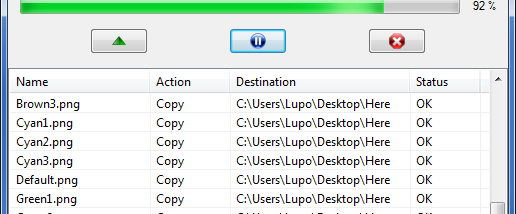

DropIt is a desktop file-sorting utility for people who regularly handle mixed files and folders and want to route them without navigating through destination directories by hand. Its floating desktop image acts as a drop target: users drag items onto it, and configured rules determine what happens next. The approach suits recurring filing tasks, such as sorting downloads, organizing project materials or sending different file types to separate locations.
Rules can match files by name or file type and assign an action and destination. For example, a rule can move documents to one folder and copy images to another. DropIt can also compress items or open them with a specified program, allowing the drop target to serve as a shortcut for routine file handling as well as folder organization. Destination folders can be assigned by format, and rules can be set up to process folders too when that option is enabled.
When a dropped group contains different kinds of items, DropIt applies the matching rules to sort and dispatch them. Users can choose how it handles duplicates, including overwriting, skipping or renaming them, which helps avoid stopping a batch to resolve each conflict manually. The settings are organized into profiles, so separate collections of rules can be kept for different projects, drives or computers rather than repeatedly changing one shared setup.
DropIt can be configured for a particular directory by defining a profile name, user-created rules, an action such as moving or copying, and a destination folder. This makes it useful for repeated workflows where incoming files need consistent handling, including filing assorted work documents, separating media by type or directing selected items to applications. Once configured, the main workflow is to drag a file or folder group onto the desktop target and let the rules handle the routine steps.
DropIt is open-source software. Its compact, drag-and-drop workflow focuses on file organization and automation rather than replacing a full file manager; users still define the matching rules and destinations that fit their own filing system. It is intended for Windows, with the supplied compatibility information covering older Windows releases through Windows 8; compatibility with newer Windows versions is not established here.