Directory Lister
Welcome to the home of Directory Lister, an innovative software developed by the renowned KRKsoft. ... creating comprehensive file and directory listings on your Windows 10 system. With Directory Lister, you can easily generate, ...

FRSFileList is a file-search utility for locating the largest, smallest, oldest, or newest files on a drive. Search a single folder or an entire drive to find a forgotten file, identify items taking up space, or review older files. Results can be copied, printed, or exported for later use. The freeware program supports Windows 7, 8, and 10, including 64-bit editions.
| Author: | Fourth Ray Software |
| License: | Freeware |
| Price: | FREE |
| Released: | Apr 15, 2021 |
| File size: | 1.82 MB |
| Downloads: | 291 |
| Keywords: | file management, Windows 10, disk space finder, Fourth Ray Software, file management tool, x64 software, FRSFileList, find old files, file finder, file search tool, lister, file lister, locator, find largest files, file list utility, directory listing software, finder |
| Author URL: | https://www.fourthray.com/ |
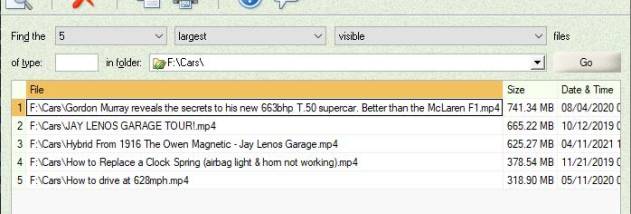

FRSFileList is a file-search and listing utility for people who need to locate files or review how disk space is being used. It can search for the largest, smallest, oldest, or newest files on a drive, making it useful when a file has gone missing or when older items need to be identified for cleanup. Searches can cover a single folder or an entire drive, so results can be focused on a specific location or used to survey a broader area.
The size-based searches help reveal files that take up the most space, including empty files that still occupy some disk space. Sorting or finding the smallest files can also help locate items that are easy to overlook. To track down a recently saved file, a search by newest files narrows the results to recent additions; searching by oldest files helps identify long-stored items for review. These options provide practical ways to inspect a disk without browsing each folder manually.
After a search, FRSFileList presents the matching files as a list that can be copied, printed, or exported. Copying is useful for transferring results into another document or tool, while printing creates a paper reference. Exporting preserves the results for later review or sharing. Together, these options make the program useful not only for locating files, but also for keeping a record of what a search found.
Typical uses include finding a forgotten download, locating a large file that is consuming disk space, and reviewing old files before deciding what to keep or remove. The ability to limit a search to one folder helps when the likely location is known, while a full-drive search is better when it is not. FRSFileList helps identify candidates for action; users can review the results before making changes to their files.
FRSFileList is freeware from Fourth Ray Software. It is designed for Windows and is suitable for basic file searches and disk reviews without a broader file-management workflow. Its core functions center on searching by file size or age and handling the resulting list through copying, printing, or export. The supplied compatibility information includes Windows 7, 8, and 10, including 64-bit editions; it does not establish support for other releases.