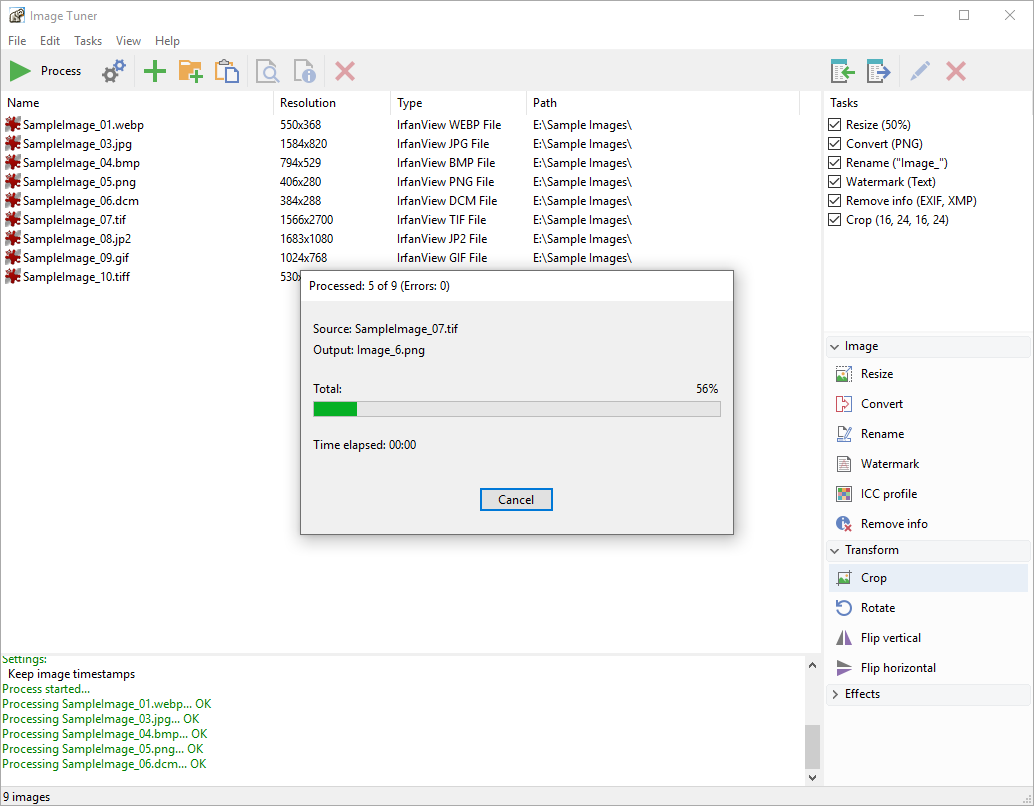
Image Tuner for Windows 10 - Full description
Image Tuner is a batch image-processing program from Glorylogic for people who need to make routine changes to multiple pictures without using a full photo editor. Its workflow centers on adding a group of files, choosing the operations to apply, and processing them together. This makes it useful for photographers, web designers, and anyone preparing image collections for websites, sharing, or storage.
The program can resize, convert, and rename images in batches. Resizing helps prepare pictures for pages or other destinations with specific dimensions, while conversion changes files between supported formats such as JPEG, BMP, PNG, GIF, and TIFF. Batch renaming provides a consistent way to label a set of files rather than editing each filename individually. These operations can be combined to handle common preparation tasks across a collection.
Image Tuner also includes practical adjustments for individual or grouped images. Users can rotate pictures to correct their orientation, adjust brightness, and change image quality when balancing appearance against file size. Watermarking adds an identifying mark to pictures before they are shared or published. Preset templates for popular social platforms help prepare images for online use, reducing the need to determine suitable output dimensions manually.
Files can be added by dragging and dropping them into the workspace, then processed through a straightforward interface intended for occasional as well as repeat use. The program operates offline, so image files can be handled locally rather than uploaded to an online service. This workflow may suit users who prefer to keep personal or work images on their own computer while performing routine batch edits.
Image Tuner is trialware and is available for Windows 10 and Windows 11, as well as Windows 7 and Windows 8 in 32-bit and 64-bit editions. Its format conversion, resizing, renaming, watermarking, and basic image adjustments make it a focused option for preparing groups of pictures; it is not positioned as a replacement for a comprehensive image-editing suite.