Screenshot Captor Portable
Screenshot Captor Portable is a Windows screenshot utility for people who need to capture, review and edit many images without repeatedly setting up each capture. Its portable form can be run without a ...

Moo0 ScreenShot is a freeware Windows utility for saving images of the desktop or the active application to a chosen folder. It provides a straightforward way to keep visual records of on-screen work and can capture website content that does not offer a direct image download. Its focus is screenshot capture rather than editing or video recording.
| Author: | Moo0 |
| License: | Freeware |
| Price: | FREE |
| Released: | Aug 17, 2013 |
| File size: | 2.73 MB |
| Downloads: | 333 |
| Keywords: | record, high-resolution screenshots, user-friendly interface, save active window screenshot, screenshot saver, free screenshot software, desktop screenshot tool, screen capture, Moo0 ScreenShot, screen capture tool, capture, Windows 10 compatible, screenshot, image capture, screen capture utility, desktop screenshot, image editing features, capture website images |
| Author URL: | https://www.moo0.com/ |
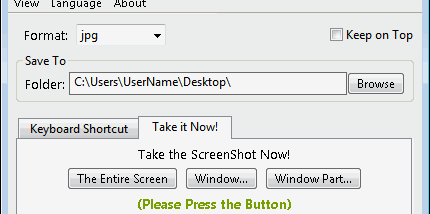



Moo0 ScreenShot is a lightweight desktop utility for capturing images of the Windows desktop or the currently active application. It is intended for people who need to save screenshots regularly, whether they are documenting a task, keeping a visual record, or capturing something displayed in a window. Captures can be saved to a chosen folder, making it easier to keep screenshots in a known location rather than searching through unrelated files.
The program covers two common capture needs: the whole desktop and the active application. A desktop snapshot records the broader screen, while capturing the active application focuses on the window currently in use. This distinction is useful when a screenshot needs to show either the surrounding desktop context or just the application being demonstrated. The resulting images can be kept as local files for later reference or sharing.
Moo0 ScreenShot can also help when a website does not offer a direct way to save an image. Instead of relying on an image download option, the user can capture what is visible on the screen and save the screenshot. This approach records the displayed image as part of the screen, so it is best suited to visual reference rather than obtaining an original source file.
Typical uses include making a record of on-screen information, illustrating instructions, saving a view of an application, and capturing web content that cannot be downloaded directly. Choosing a specific destination folder supports a simple filing workflow, especially for people who take screenshots often and want them grouped with other project or reference files.
The utility is freeware and is designed for Windows desktop use. Its function is focused on taking and saving screenshots; it is not presented as a video recorder or an image-editing suite. The available operating-system information covers older Windows releases, so compatibility with newer Windows versions should be checked before installation.