
Moo0 WindowMenuPlus

Moo0 WindowMenuPlus 1.24

Extra controls in every window's system menu

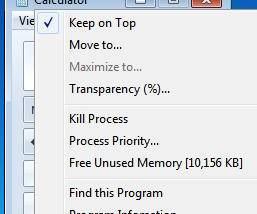
Moo0 WindowMenuPlus adds controls to the system menu opened by right-clicking a window's title bar or taskbar button. Its commands include Always on Top, transparency adjustment, process priority settings and program information. Users can hide unused menu items through the notification-area configuration, keeping frequently used window and process controls close at hand.

Moo0 WindowMenuPlus 1.24 details

Author:
License: Freeware
Price: FREE
Released:
File size: 4.20 MB
Downloads: 230
Keywords: window menu, Windows 10 utility, window transparency control, system, enhancement, system menu, system enhancement tool, program information tool, window menu enhancer, extra system menu, extra menu, Moo0 WindowMenuPlus, advanced window management, process priority changer, menu, x64 software, always on top utility, process monitoring
Author URL: https://www.moo0.com/
Moo0 WindowMenuPlus screenshot
Moo0 WindowMenuPlusOtherWindows XP, Windows Vista, Windows Vista x64, Windows 7, Windows 7 x64, Windows 8, Windows 8 x64, Windows 10, Windows 10 x64

User Rating: 0 (0 votes)

Windows 10

x32

Windows 10

x64

Moo0 WindowMenuPlus Awards

Windows 10 download editor's pick

Moo0 WindowMenuPlus for Windows 10 - Full description

Moo0 WindowMenuPlus adds extra commands to the system menu of open windows. The menu is available by right-clicking a window's title bar or its taskbar button, so the added controls can be reached from the window being managed. It is intended for people who want quick access to common window and process adjustments without opening a separate utility for each task.

The added commands include Always on Top, transparency adjustment and process priority adjustment. Always on Top keeps a selected window above others, which can help when referring to a calculator or another small utility while working elsewhere. Transparency controls change how opaque a window appears. Priority options adjust the process priority associated with the window; setting a video player to Above Normal is one practical example when playback needs more scheduling attention.

A Program Information command provides details about the application displaying the selected window. This can help identify a process or gather information when diagnosing an issue. The configuration is accessed from the program's notification-area icon, where menus that are not useful can be hidden. That lets users keep the system menu focused on the controls they actually use rather than adding every available command.

WindowMenuPlus fits occasional desktop tasks as well as repeat adjustments across multiple applications: pinning a reference window, changing its transparency, modifying process priority or checking which program owns a window. Because commands are attached to the standard window menu, they are available in context rather than through a separate control panel. The program is freeware. Its stated operating-system support includes Windows 10; Windows 11 support is not established by the available compatibility information.

Moo0 WindowMenuPlus for Windows 10 - Post your review